Text wildcard doesn't respect line break
Answered
We need an Address field in Contracts subject exactly as what we have in Events subject for the event account and event contact. I've tried creating a formula field to replicate this but I can't figure out the correct CRLF combo to get the format correct.
ON screen, it looks great:

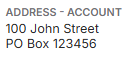
In my Word merge document:
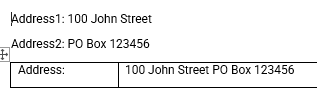
Address custom formula field:
=TEXTJOIN(CHAR(13)&CHAR(10),TRUE,{Address 1 - Account},{Address 2 - Account},{Address 3 - Account},{Address 4 - Account},{Address 5 - Account},{Address 6 - Account})
Richard Marmura I think I'll need Dustin Banks on this one.
-
Seth Halvaksz can you put eyes on this?
-

Tony, sorry i don't understand what you're asking. Is this an enhancement request, or a bug?
-
Seth Halvaksz need to know if what i'm trying to do IS possible, or if I'm going about it wrong. if it's not possible, then I can put in Pendo feedback. In the past, i'd go ask Dustin Banks directly, but trying not to do that anymore.
-

This is likely an enhancement request and I'll reach out to eng to get an estimate on effort.
-

Anthony Costantino and @..., if an address should be broken up into multiple lines, it should be multiple wildcards so you can put the part that you want on each line.
-
Dustin Banks the issue is in the execution. for THIS specific use case, i'm looking for a wildcard in the Contracts subject that adapts to the absence of address lines. Similiar to the Address wildcard available in the Events subject.
I need to support both of the below use cases:
-----------------------
100 Main St
Metropolis, NY 12345
– OR –
200 Main St
PO Box 123
Metroplis, NY 12345
------------------
and I can't have on my template document:
------------------
100 Main St
Metropolis, NY 12345
---------------------------------Is using Mailing Address Labels my only option?
What can I use if I want have another use case unrelated to address labels where I want a wildcard that merges two or more text strings together with a line break in-between ONLY if the second line exists?
-
Anthony Costantino, the only way to do what you want to do is to build it in an html template, then nest the template in your document. In the html template, you have to check a wildcard to suppress an element and all of its children. https://gomomentus.sharepoint.com/:w:/g/SoftEng/Ea6RBb2s8gBJk410WifwAhYBC8YzuwZkT_pUOefu4KAr4g
Please sign in to leave a comment.
Comments
7 comments
Date Votes