New UX - Report cannot be ran from Report Master
Answered
Description of the issue: New UX - Report cannot be ran from Report Master
Account name: The International Centre
Region: Americas
Client version:
25.12025071401 (PROD)
25.12025052101 (TEST)
Steps to reproduce:
Classic UX
Log into local site
Access the Accounting Dashboard and go to the Accounting Favorites Gadget
Click the “Detail General Ledger Summary” Action Button
The Report Master opens
Click on any of the reports > Double Click > Report Prompt will open and you can run the report
New UX
Log into local site
Access the Accounting Dashboard and go to the Accounting Favorites Gadget
Click the “Detail General Ledger Summary” Action Button
The Report Master opens
Click on any of the reports, but there is no option to run any of the reports
See Screen recording of steps comparison from Classic UX to New UX: 357917_2025-08-11_16-51-39.mp4
Observed results vs Expected results: In the Classic UX, when reports shared a Report ID, if you had an Action Button established to run a report that had the same Report ID as other reports, the Report Master would open and you could select which report to run. Now, in the New UX, the Report Master will still open, but you cannot select a report and run it.
What is the job the client is trying to accomplish: Customer wants to be able to select which report to run.
Business impact if not resolved: Workarounds had to be implemented to allow the customer to run these certain reports, as the action button was the only way the customer knew to run the reports.
Articles Referenced:
Searched for similar Jira cases
Import Custom Reports
Add a Custom Report
Add a Report to a Report List
Custom Links
Link to Zendesk ticket: 357917
Local Site PROD: https://supportwebus.ungerboeck.com/InternationalCentre_Prod/app85.cshtml?ReturnUrl=%2fInternationalCentre_Prod
Login: usiadmin / ITRocks2014
-
Hi there Cathy Herrick - Do you have any insight into this issue?
-

Carissa Harrison and Richard Marmura - not sure which one of you can better answer, this is a difference between Classic and New UX to do with reports accessed by action buttons.
It sounds like may be an architecture gap between how Classic and New UX flow when using both the action buttons and also reporting. Do you think this is something we should submit as a Jira or have the customer request as an enhancement?
-
Carissa Harrison or Richard Marmura - the customer has escalated this ticket.
Can either of you confirm if this is an architecture gap that we should submit a bug case for?
-
Spoke to Richard Marmura on the Product Office Hours meeting on 8/20/2025. He wasn't sure if this functionality would make a return in the New UX, but would follow up with Carissa Harrison for more information.
-
Carissa Harrison - Shelby figured out a workaround for the client to use, so we just need to know if ultimately the behavior is a bug/gap and we need to submit a Jira, or if this is working as designed and we should have them submit a feedback request.
-

Cathy Herrick @... what is the work around?
-
Hi there Carissa Harrison, thanks for reaching out.
Since this customer had three reports with the same Report IDs, I recommended the customer make the Report IDs unique. Then each report ID got their own respective Action Button.
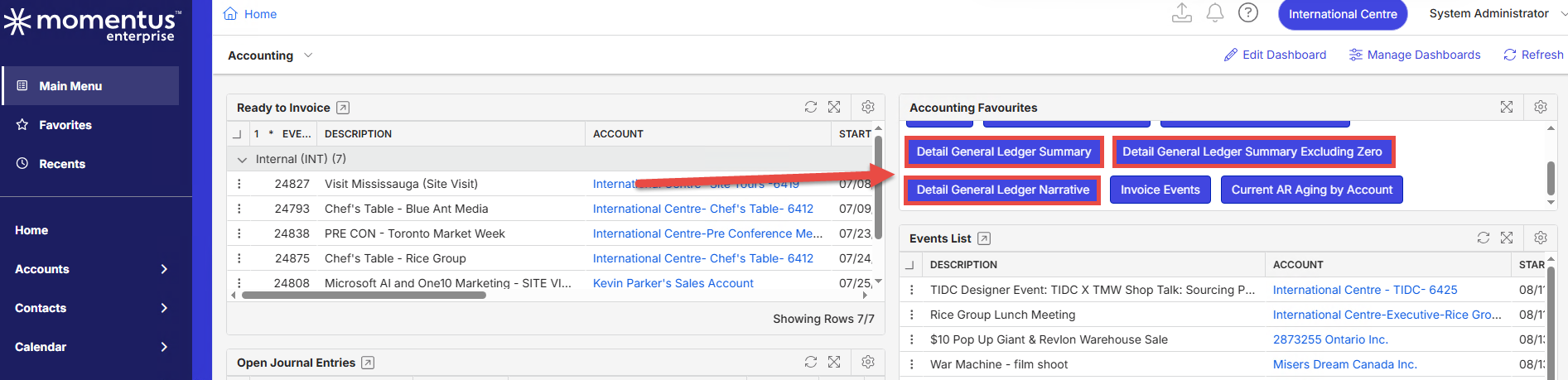
Previously, in the Classic UX, the customer used a single Action Button for all three reports. Since they had the same Report IDs, the Report Master would open after the Action Button was clicked. The customer could then double click on one of the three reports to execute it.
In the New UX, the Report Master will still open, but the reports cannot be executed from this window. -
I need to follow up with Dustin Banks on this when he's back end of next week. This wasnt an intentional change but I'm not sure if the changes to moving to a routed application inconsequently changed this. I need engineering input on this. Its likely a gap where the app doesn't know what to do when multiple action IDs share the same path.
I would expect it to open the drawer with the Report Master window details filtered for the 3 actions. Similarly, if you just opened the report master from the events grid or any grid. -
@... This is a feature gap, we need to pass in a proper advanced search window, which is what would open when their are multiple reports with the same report id.
-
Hi Carissa Harrison - Thanks for getting back to me! Just to make sure I am understanding you correctly, since this is a feature gap, would you like me to create a Jira case?
-
Hello Carissa Harrison - just following up on this. I wanted to make sure I understood you correctly, and the support ticket associated with this post is still open. Should I send a Jira you way for this feature gap? Or something else?
-
@... Please submit a JIRA ticket for this. Please also note your workaround you advised the customer too.
Please sign in to leave a comment.
Comments
12 comments
Date Votes