Different price list for booking orders
Refer to Product Ideas
Hello team,
Description:
We’re working with Destination Rennes on a scenario that appears to be limited by current system capabilities. I’d like to confirm with the Product team whether the following use case is supported, and if not, whether it’s on the roadmap or worth submitting as an enhancement request.
Use Case:
- An event is created in advance in 2022 and bookings (rental spaces) are added at that time, using the 2022 rental price list.
- In 2024, the customer wants to add additional bookings to the same event. However, Destination Rennes do not want to use the 2022 prices, they would like the new bookings to reflect the 2024 rental pricing.
- The 2024 price list has been added to the event.
- The expectation was that a new booking order (service order) would be created, allowing it to be repriced with the 2024 price list. However, we are unable to find a way to:
- Assign a different price list per booking order
- Reprice using a different price list once the booking is createdAre there any recommended workarounds or configuration tips that could help achieve this use case?
-
Are there any recommended workarounds or configuration tips that could help achieve this use case?
-

Minka Verkaar can you help with this one?
-

Hi Aurelien Baur I have seen your case and I need to test a few things. I will come back to you.
-
Hello Minka Verkaar , have you had a chance to take a look yet ? Let me know if you need additional information.
Thanks,
Aurel
-
Hey Aurelien Baur, Seth Halvaksz and Carissa Harrison
As promised, I tested your case because I think this is a common business case for many venues and I am curious to see how it works in our system.
My recreation steps and test-results below:
1. I created an Event with Bookings, all related to Price List 2025.
2. I created a Contract based on the entered Bookings with status Contract Signed (60)
3. In the Event, I added in the field ‘Price Lists’ the new Price List (2026) and the old Price List (2025)
4. I created a new Booking, but at this point the Booking will only give you the rates for 2025 (the ‘old’ Price List) while I would like to offer this new Booking with the Prices of 2026.
5. It does create a new Service Order for the new added Space(s). You can see this new Service Order is not added to a Contract yet (which is fine too)
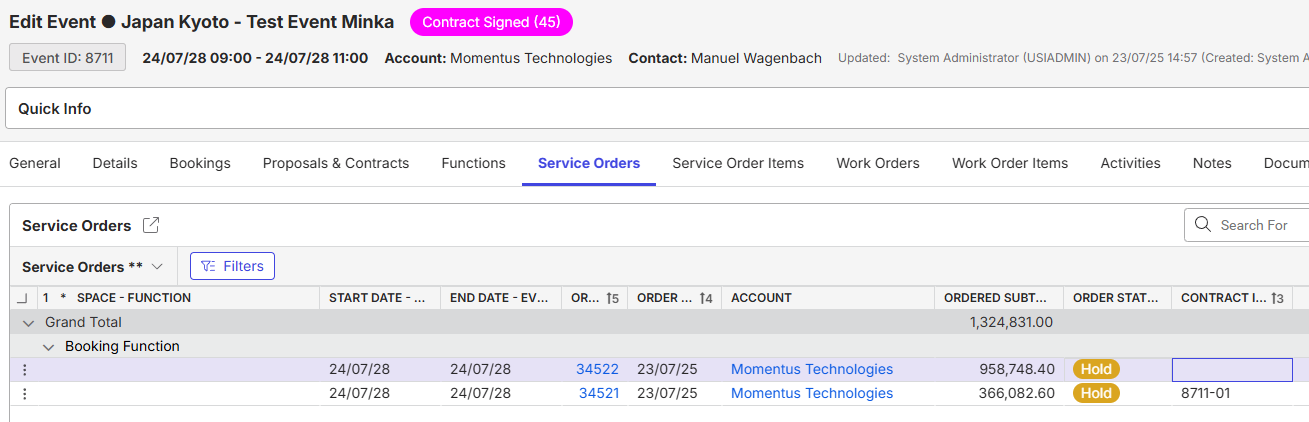
6. Now I tried to Reprice this new Order to the new Price List (2026) with the functionality Reprice/Recost Order, but the system gives me this warning:

And here is the gap in my opinion. The message itself is correct, but I miss the option ‘NO’. Now I can only Continue which means I am going to Reprice both Booking Orders, or I can select ‘Cancel'. This would be an enhancement request which will help many sales departments a lot.
The only workaround I can think of for now is to skip the Booking Rates and book them as Service Order Item in a separate Service Order.
A) Leave the Booking Rates in the Booking Tab empty
B) Create a new Service Order (can be linked to the Booking Function) and select the Room Rentals as Service Order Item. When selecting ‘Add Service Order’ you are able to select the Price List 2026. (or any other Price List you have linked to your Event in the field Price Lists)
Note: the only risk in this way of working is that when you cancel the Booking (or make changes) you need to manually update the corresponding Service Order Item with the Room Rates, while this is not the case when you work with the Booking Rates.
The thrust of this case is that spaces are booked far in advance at the then current rate. If additional rooms are needed later (and there can sometimes be a year or years in between), the venue usually wants to offer the rooms at the price level at that time with the aim of making more money. So that is why I see this enhancement as a popular enhancement.
Hope this helps!
-
Thanks Minka for this write-up. Could you help create the enhancement request in Pendo, and add the link here?
Copying Carissa Harrison on this enhancement relating to reprice of booking orders
-
Thanks Minka Verkaar for your great answer ! Seth Halvaksz / Carissa Harrison I have created a request in Pendo: https://app.pendo.io/s/6229449325477888/listen/feedback/views/ZWNAnL_3nsJ6p5EtfWhAOeEO8vg/items?openItem=Wkw6KUXGXDtuEBqozyud4nZVu6A
Please sign in to leave a comment.
Comments
6 comments
Date Votes