Orphaned Accounts - how/what/when?
Answered
Hi team,
A customer of mine is working on their CRM-clean up. Following this article it states that “when all designations for an account or contact are set to Not Applicable”, it is moved to Orphaned Accounts: https://supportcenter.ungerboeck.com/hc/en-us/articles/205914668-Orphaned-Accounts-and-Contacts. In other documentation I found it is when the “Event Sales Status”-designation is on Not Applicable.
When my customer checks the Orphaned Accounts window, there are accounts/contacts listed who don't meet the above requirements, see screenshot:
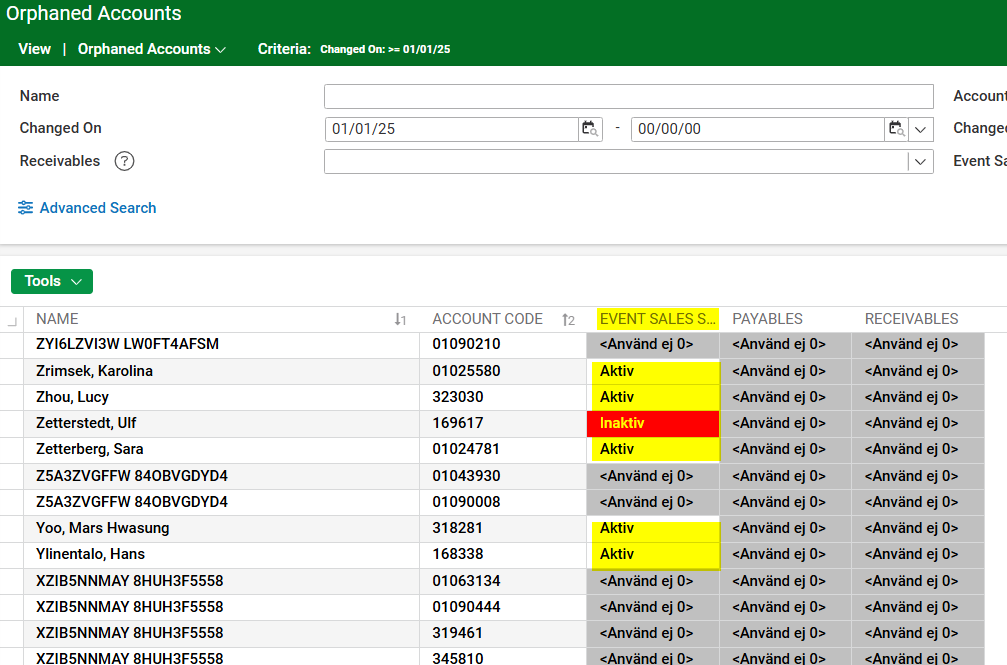
Can someone help explain why these accounts/contacts show up here?
And what the exact “rules” are to get accounts/contacts in the Orphaned Accounts window?
Thanks!
-

I'll find out
-
I'm digging into this, and sounds like these “orphaned” accounts are based on something called “designations”. However these “designations” are no longer visible in the product.
We're going to need to open a ticket to explore when/if “designations” were removed from the product. Its possible that this “Orphaned Accounts” page wasn't updated.
-
Tagging @... to open a ticket to understand if there have been changes to “designations” and if we need to update this Orphaned Accounts window to use different logic.
-

Per Naresh:
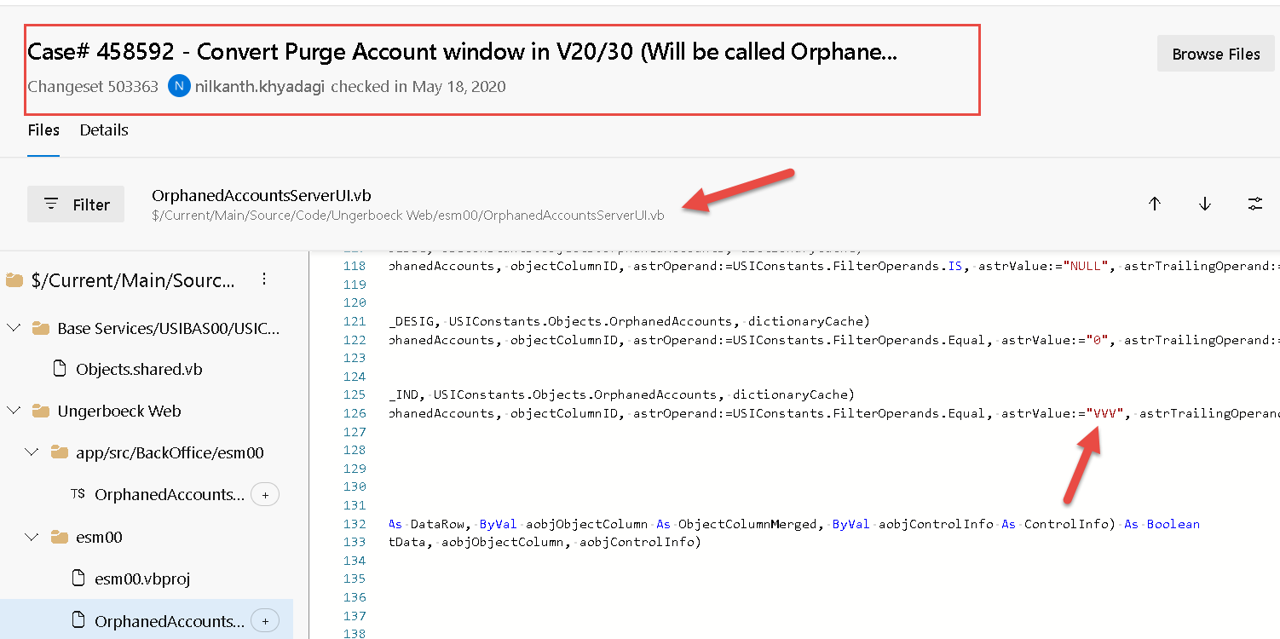
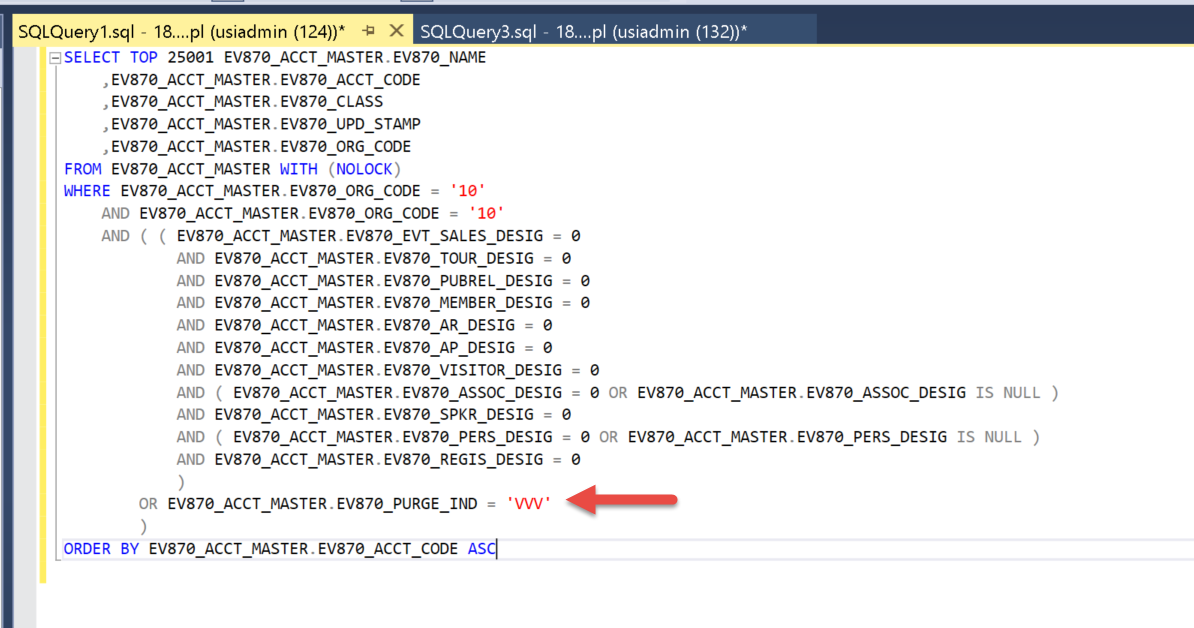
The query below is used to display all accounts listed on the Orphaned Accounts page. In addition to checking for missing designations, it also includes accounts where the purge indicator is set to 'VVV'.In version V19, the purge window (or possibly another window) offered an option to clear all designations for an account. Doing this would effectively mark the account as orphaned. There was also a separate option to mark an account as purged without removing its designations or deleting the account. This action would simply set the purge indicator to 'VVV', which also caused the account to appear under Orphaned Accounts.
When the system was upgraded to V20, this specific option to set the purge indicator to 'VVV' was no longer available. However, to ensure continuity and visibility of accounts that were marked this way in V19, we added a filter in the query to include them. That’s why in V20 / V30, we see some accounts or contacts under Orphaned Accounts that still have valid designations but were marked as purged ('VVV') back in V19. This is working as designed. Thank you!
-
@... will the Support Center article be updated with the above info?
-

Laura de Jong It's on our list! I'll post here when the update is complete.
-
https://supportcenter.ungerboeck.com/hc/en-us/articles/205914668-Orphaned-Accounts-and-Contacts has now been updated. And thanks to Naresh for the clear explanation, made it easy for us. 🙂
-

Hi @... and Seth Halvaksz, I have taken over this topic as part of Services Direct. I understand the explanation regarding the ‘VVV’ (thanks to Naresh for the clear explanation) and since this customer also used our system in V19, it makes perfect sense.
However, since the Event Sales Designation is still Active on these Accounts, the customer doesn't want to purge or delete these. Is there a way to ‘move’ them out of the Orphaned Accounts - bucket? It sounds to me we would need to remove the ‘VVV’-Indicator; is that possible?
-
@... is going to follow-up on this
-
Minka Verkaar The accounts are appearing in the Orphaned Accounts window because of the legacy
EV870_PURGE_IND = 'VVV'flag that was set back in V19. In V20/V30, the window logic still includes those for visibility, even if they still have active designations.If the customer wants to move those accounts out of the Orphaned Accounts list without deleting them, the only way would be to clear or reset the purge indicator.
That can’t be done through the UI anymore, since the purge indicator option was removed in V20. It would need to be handled through. I will dig deeper what is needed to remove them and what if anything is impacted.
-
Hi @... thanks for reply. I have a follow up meeting with the customer next Monday (17th), if there is anything you can share, that would be amazing.
-
Minka, what additional info do you need? It looks like Michelle already responded in the previous comment.
-
Well, @... her last sentence is open: “ It would need to be handled through. I will dig deeper what is needed to remove them and what if anything is impacted. (if that is even possible)”
I have an answer how it is caused and that helps, but I don't have a solution yet to move these Accounts back, out of the Orphaned Accounts bucket.
By the way, this request belongs to the same customer who wants to anonymize their Orphaned Accounts due to GDPR.
-
Ok - the only possibility i can think of is to update via API. It doesn't look like the
EV870_PURGE_IND = 'VVV'flag is available in the accounts API.Let me ask - why do you want to move these accounts out of the Orphaned Accounts window? is there an action you can take in that window, that you don't want someone to do by accident? Trying to understand the issue here.
-
Hi Seth Halvaksz these Accounts are added in the Orphaned Accounts-bucket because of the ‘VVV-Flag’ which was available in V19. But since these Accounts are still having the Event Sales Status on Active, the current Admin doesn't want to permanently remove (=Purge) them and rather move them back to the active Accounts List.
But since this VVV-Flag is no longer available, there is no option get them out of this bucket. There are no options in the Orphaned Accounts, other than Purge (which is removing them) or Edit the Account Status. But these are already on Active.
I know we are not a huge fan of SQL anymore, but since this seems a pretty ‘stand-alone’ configuration, could this maybe an option?
-
Ok - so you're saying that there is a way to purge Orphaned Accounts, and it uses the “VVV-Flag”? Where does that happen?
-
Hi Seth Halvaksz, I think you are able the Purge them just as any other Orphaned Account, as long as they are not linked to any Account/Contact/Exhibitor/Order etc. But since we can not check this on the Orphaned Accounts Window (if it is being used somewhere), I can not confirm this for 100%.
But my question is to other way around; how can we move the VVV-Flagged Accounts back to the Accounts/Contacts? That could have been possible by removing the VVV-Flag, but since the field is no longer available in our current version, I am looking for another way.
Business Case: the customer would like to clean up the Orphaned Accounts as part of the GDPR Regulations and we have indicated the following steps to be taken:
1. Move the Active Accounts back to Accounts/Contacts (the ones with the VVV-Flag)
2. Purge the list for all Accounts/Contacts which a no longer in use and not linked to any Account/Contact. etc (which the customer can do themselves)
3. Anonymize the Orphaned Accounts/Contacts which are linked to an Account/Contact/Order (see also separate communication with Max around this request)
-
Ok - i think we need to verify how you purge accounts. My guess is you cannot purge accounts using that data field anymore, so the VVV-Flagged accounts data isn't used, and not worth the effort to reset.
-
Just to be clear: the customer wants to move these VVV-Flagged Accounts back to the Active Event Sales. So get them out of the Orphaned Accounts bucket, by moving them back to Accounts - Event Sales.
-
Ok got it. So removing the VVV-Flag should move these accounts back to Active Event Sales.
-
That's exactly what I hope for ;-)
-
@... did you learn any options here for engineering?
Minka Verkaar i expect this will need to be tech services request to make a direct database update to update these values, if no APIs exist.
-
Hi Seth Halvaksz That is okay, and we have also budget to charge the customer for this. (and we could re-use this for other customers in the same situation as well) Please let me know if we need to move this conversation to TS so I can involve Roman.
-
Hi Minka Verkaar, this is correct. This is not feasible via API. It would be possible to use a custom SQL query if they have a list of accounts (account codes). This would be a technical services lift.
-

Hi @... we have run the SQL script and it worked fine for the majority of the Accounts. However, when checking the results (Accounts with an Inactive Status still appearing in the Orphaned Accounts), we found also some values in the Purge Indicator with value ARI or EEA.
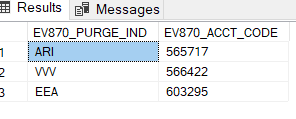
Is there somebody who can give us details about this? Because it seems this is also a trigger for an Account to show in the Orphaned Accounts, while (one of the) status(es) is still on Inactive.
In Accounts - All > Event Status is Inactive and so is the Account Status:
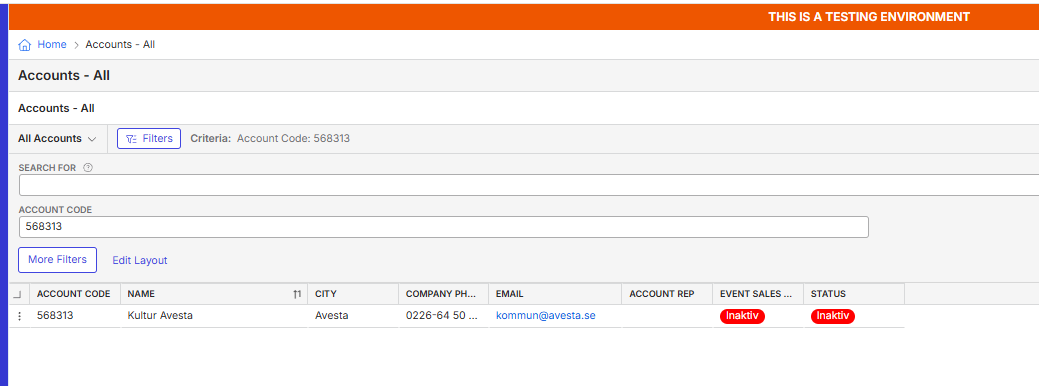
And it still shows in Orphaned Accounts, because of the EEA or ARI Flag in the Purge Indicator:
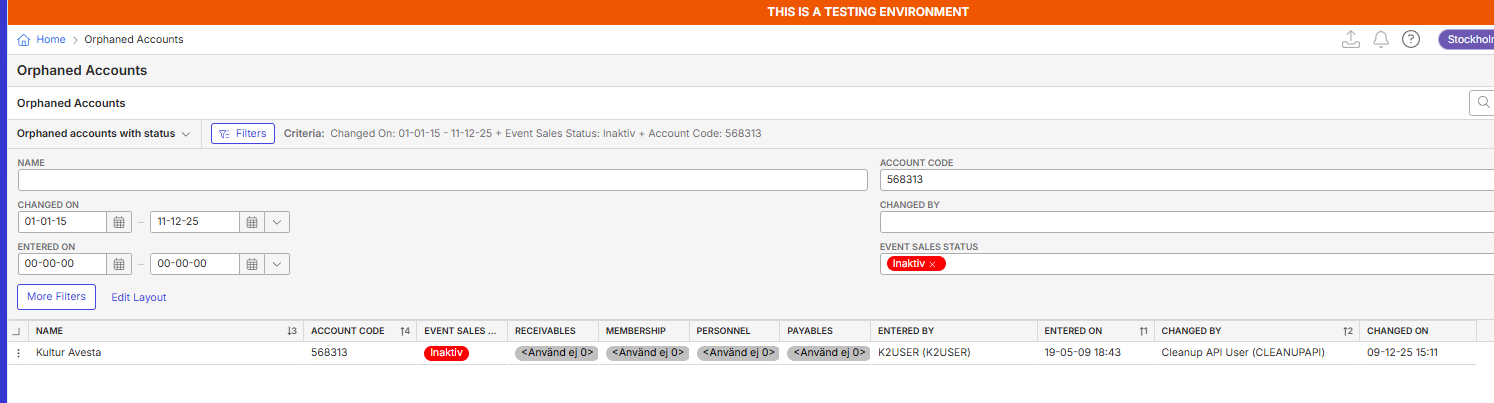
We would like to know if it is save to remove this value too.
Thanks
Minka
-
Hi Minka Verkaar , I'm going to schedule a call to sync on this issue.
-
Adding additional info from engineering on the purge indicators for ARI and EEA:
The purge indicator data map is currently used to store a reason why an account could not be purged. This applies in scenarios where a purge was requested and processed, but the account could not be fully purged due to dependencies or other constraint - so a reason code is stored in this field.
Previously, in V19, we used the value "VVV" in this field to mark an account as purged. That behavior has since changed. It’s possible that "EEA" was also historically used as a code to indicate a purged account (along with all designations being set to 0), but that no longer appears to be the case.
Currently, when an account is successfully purged, the only action taken is setting all designation values to 0.
Based on this, I believe the two accounts shown in the screenshot with EV870_PURGE_IND values of "ARI" and "EEA" are appearing under Orphaned Accounts because:
- All of their designation values are set to 0, and
- Their Account Status should have been set to 0 (Not Applicable) at the time of the purge.
Since the Account Status was instead changed to Inactive, these accounts now appear under both Orphaned Accounts and Accounts All, which is not correct.
Going forward:
- If the customer believes these accounts should not appear under Orphaned Accounts, update one or more of their designations to a value other than Not Applicable.
- If the accounts should be considered orphaned, update the Account Status to Not Applicable.
-
If anyone has the same issue with seeing ‘Active’ or ‘Inactive’ accounts in the Orphaned Accounts section, below is a short explanation and solution:
How the system should work:
When all designations for an account or contact are set to “Not Applicable”, the record is moved to Orphaned Accounts and is no longer visible in Accounts.What can go wrong:
For older customers (>10-15 years), you may still see records in Orphaned Accounts with a status set to Active or Inactive. This is usually caused by an old field from version V19 called the Purge Indicator. In the past, this field could be set without changing all designations to Not Applicable.How to fix this:
f the customer wants to clean up Orphaned Accounts, we can run a SQL script based on the values in the Purge Indicator field (VVV) and/or the Account Designation fields.If all designation values are set to "Not Applicable" and the Purge Indicator value is VVV, they should remove the VVV Purge Indicator value and set at least one designation field to something other than "Not Applicable".
If all designation values are set to "Not Applicable" but the Purge Indicator value is not VVV, they should set at least one designation field to something other than "Not Applicable".
If at least one designation value is not set to "Not Applicable" but the Purge Indicator value is VVV, they should remove the VVV Purge Indicator value.
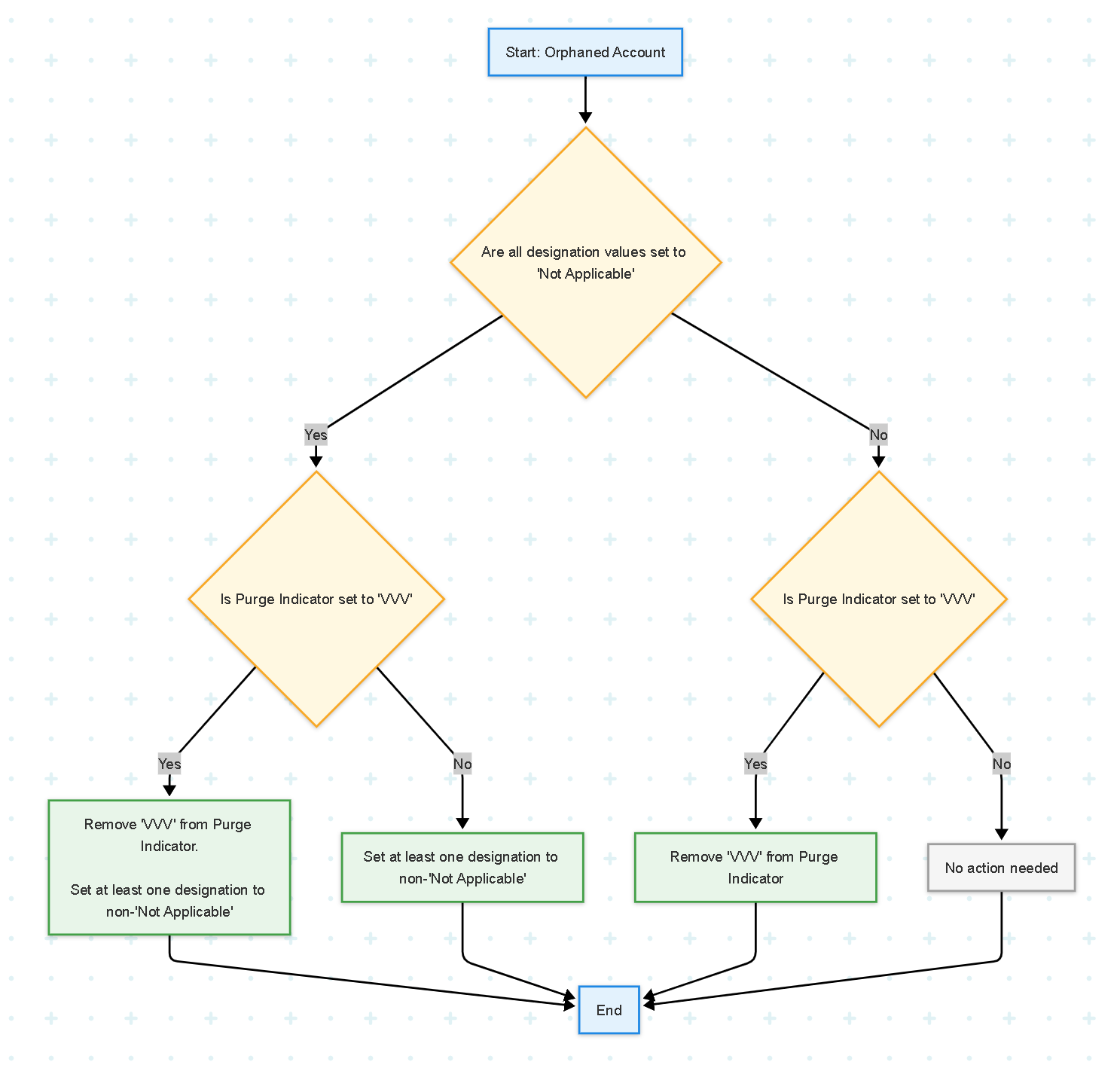
Note:
Always check the SQL script with Technical Services before running it.
Please sign in to leave a comment.
Comments
28 comments
Date Votes