Use preferred booth area to populate item quantity
Answered
Hi team,
I have a question about the following field/functionality.

The Help Text on this field says that it can support in auto-populating the quantity of the item in EXP, based on the Preferred Booth Area. However, when I test this functionality, it doesn't work as expected.
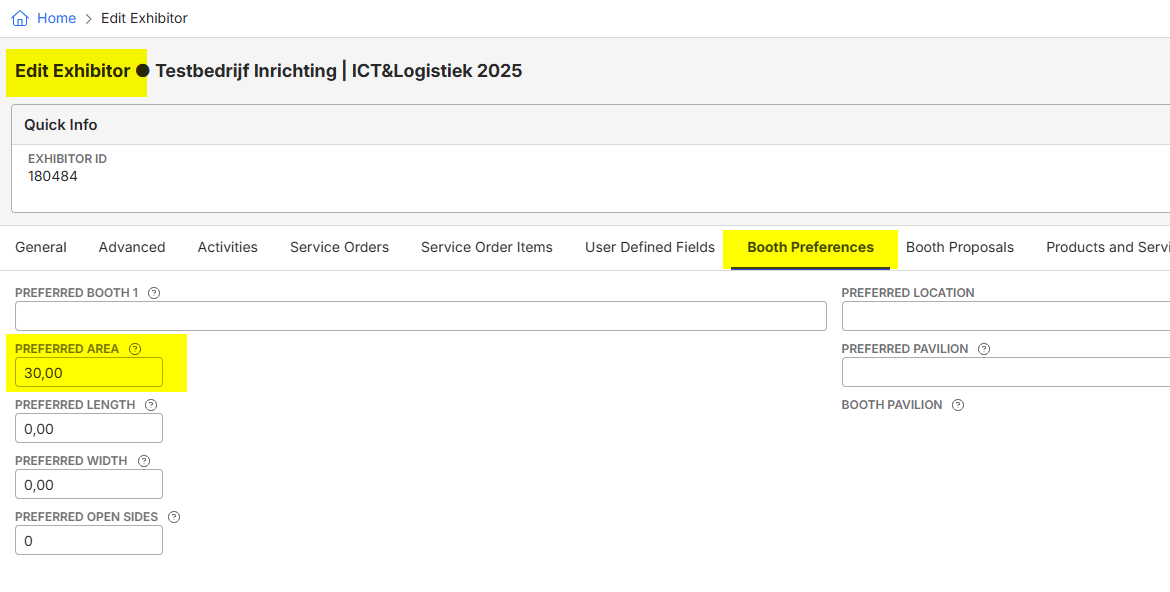
In the Exhibitor, I have filled 30,00 in the Preferred Area Field:
However, when I go into the Exhibitor Portal, it shows 12 as minimum quantity based on the Minimum Quantity of the Package Set Up:
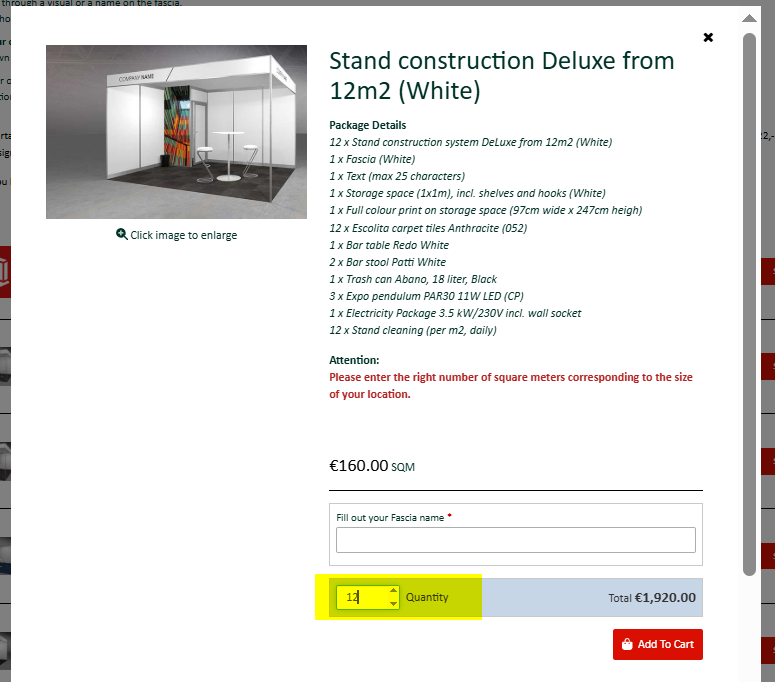
I would expect that this shows 30. Is this a bug?
I have also checked other Documentus posts, but these items were based on the other field called “Use booth area to populate item quantity” which is related to ESC.
I have also checked the Support Centre: https://supportcenter.ungerboeck.com/hc/en-us/articles/216584997-Add-a-Resource
@... I think there is a mistake in this article; based on the Help Text in the system the field Use booth area to populate item quantity is only applicable for ESC. However, in the Support Article it says EXP:

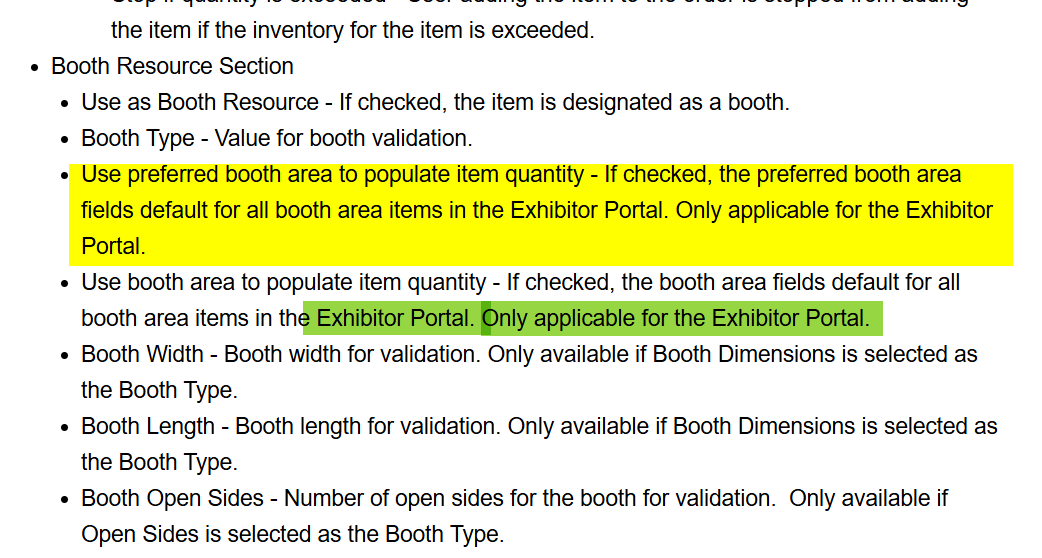
Details:
Database: https://jaarbeurs.ungerboeck.com/TEST/app85.cshtml
Exhibitor ID: 180484
Credentials: minka.verkaar+mickey@gomomentus.com / Minka123
Thanks
Minka
-

@... please review
-

Minka Verkaar - per engineering:
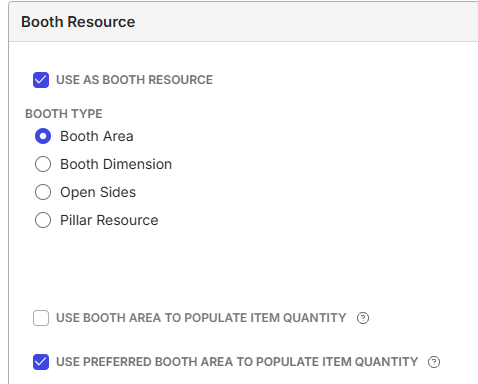
I don't think the setup is correct. I believe in order for the "Use Preferred Area to populate item quantity" checkbox to work, the price list item resource has to also be marked as a Booth Resource of type Area, which it is not in her picture in the post
The resource should be like this:
-

Hi @...
Thanks for the feedback. I have tested this earlier, but without the result I was looking for. As per my understanding (and the tests are confirming this) this option is only used for the actual Booth Resources, like calculation of the M2. When you look at the screenshot below, I have added the Resource Corner Location to this booth (with the settings as Engineering is referring too) and this works fine.
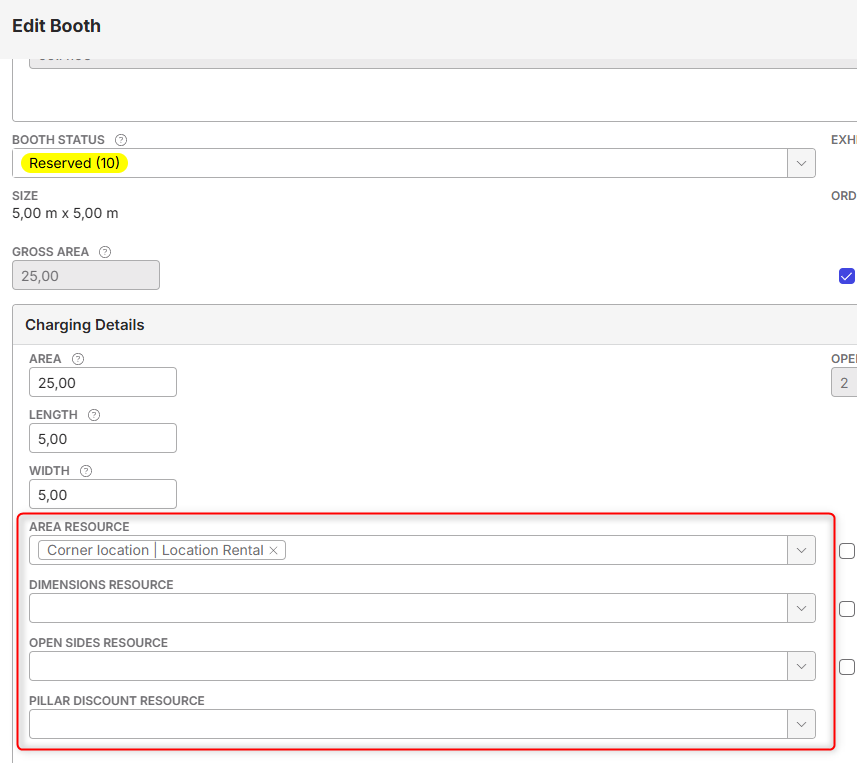

In the Portal, it shows like this:
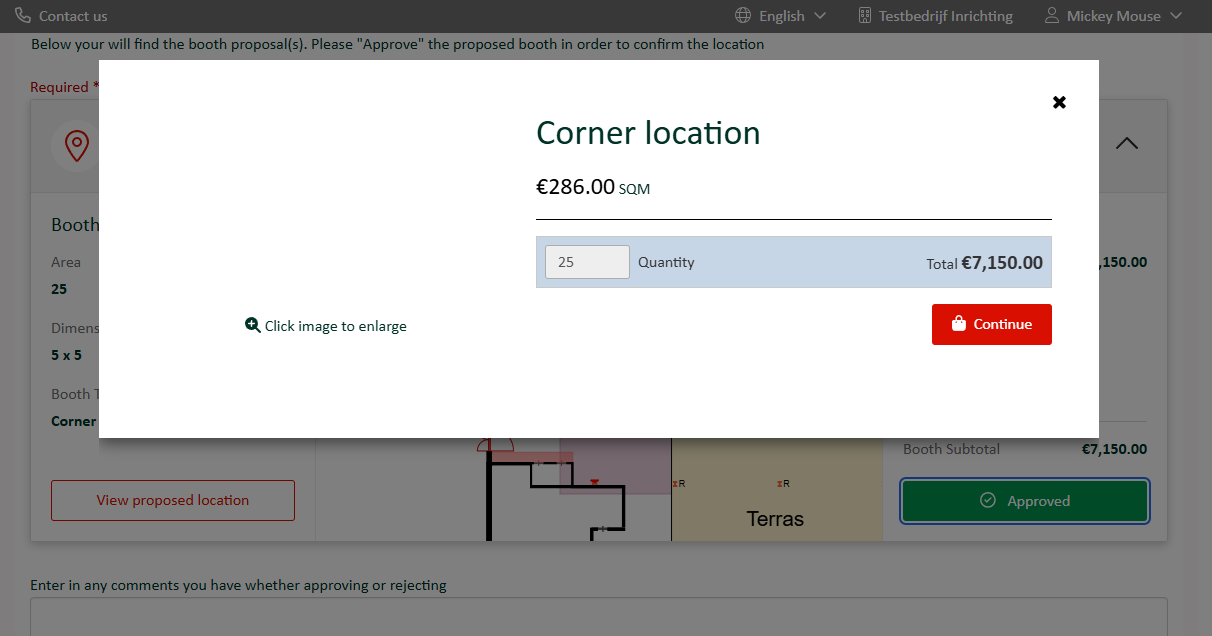
So all good.
However, my question is related to adding additional items in the next steps, like Stand Construction, or Carpet. I was hoping that this setting would give me the same result, but it doesn't:
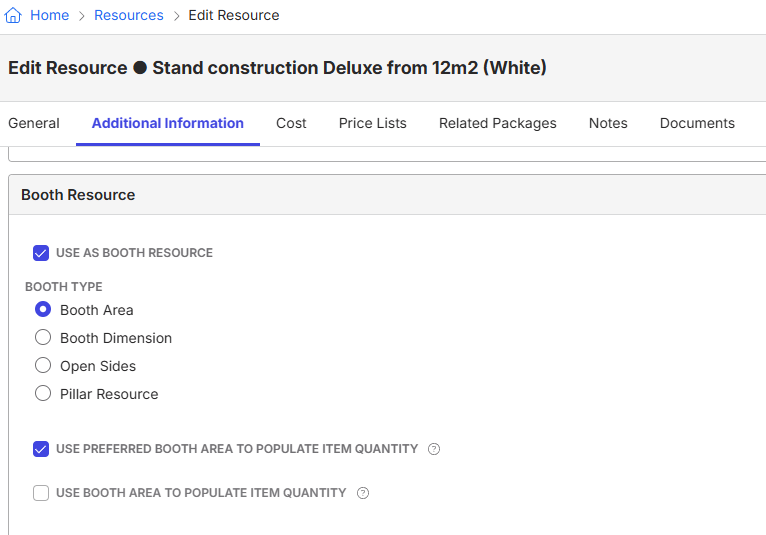
It still takes the 12 as the minimum (taken from the Package Header - Min Quantity setting), but this does not match the accepted booth of 5x5 = 25m2 nor does it match the Preferred Area field at the exhibitor level (which should be 30 in my example)
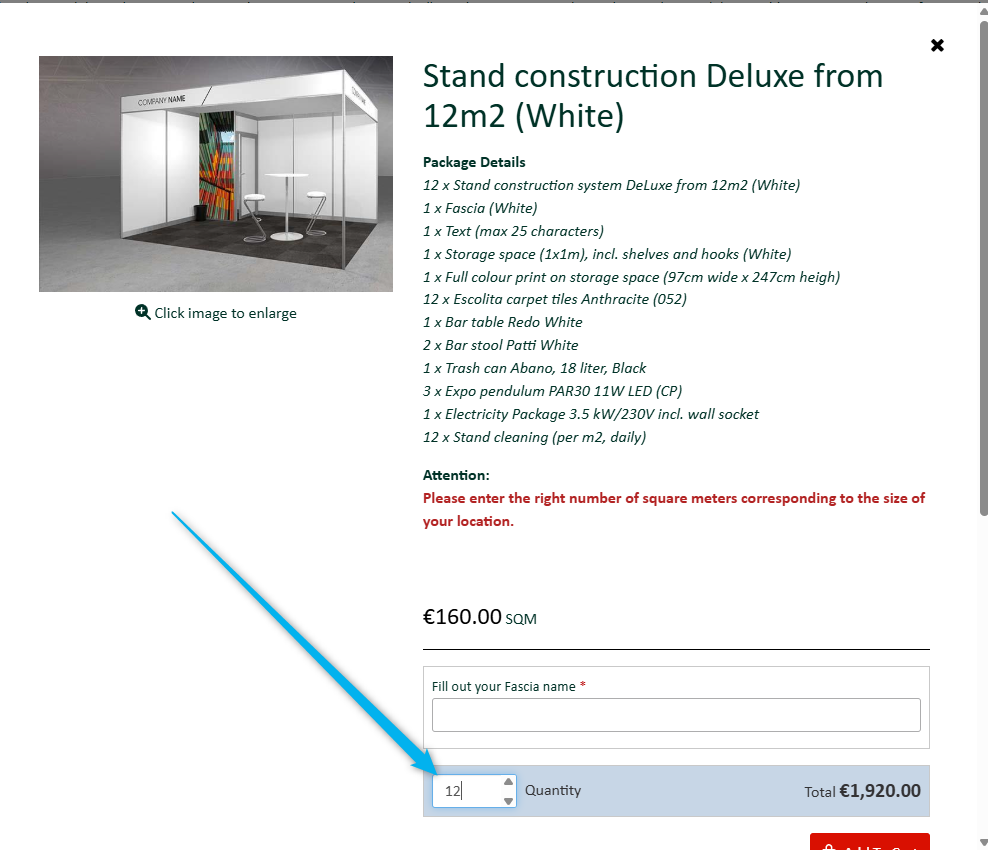
So my question remains the same; is this field ‘broken’, is there another option to configure this or is this a gap?
Thanks
Minka
-

Minka Verkaar I don't have an answer to the outstanding question, but wanted to let you know that we've corrected Add a Resource as you noted. Thank you for letting us know!
-
@... / Seth Halvaksz I see this posted is marked as ‘Answered’ but the shared solution does not work. Can you please check my response from last week?
Thanks!
Minka
-
@... can you help on the outstanding question
-
Hi @... any updates which I can share with the customer?
Thanks!
-
Minka Verkaar I'm working on getting an answer for you on this from Engineering. Will report back here as soon as I have something for you!
-
@... any updates on this case?
-
Minka, here's the response from engineering:
"Okay so I have tested in 25.1 (not sure what version the customer is on but figured this was a safe version to test on - we haven't intentionally changed anything around this in a VERY long time so it should be working the same everywhere)
I configured an EXP with a Preferred Area section and many different order items all set to use the preferred area for item quantity:
Sqft - Booth Item - No Min Qty
Sqm - Booth Item - Min Qty - 5
Coffee - Non-Booth Item - No Min Qty
Busch Beer - Non-Booth Item - Min Qty - 12
Package Priced By Details - Booth Item - Min Qty - 5
Package NOT Priced By Details - Booth Item - Min Qty - 5And tested by setting the Preferred area within the task as well as in backoffice and then entering the task and in both scenarios, all order items are correctly setting the selected amount to the preferred area entered and NOT to the minimum quantity (as long as the preferred area was more than the minimum quantity).
This is working regardless of the resource being a Booth Resource (so the dev guidance that was provided earlier was wrong)
I did notice there is a Minimum setting on the Package (selected on the resource) but was able to confirm that EXP does not respect that setting and only respects the PL Item Minimum.
I tested by both selecting on the detail pane vs in the list and it continued to work as expected in every scenario.
I'm not sure if there is something wrong with their package or their setup. I am unable to log into their TEST backoffice link and the provided EXP link is directing me to backoffice, not EXP, so I'm unable to log into that either to take a closer look. I guess they can enter it as a bug to have dev look at it more closely but, as I am unable to recreate their issue with everything I've tried, I'm going to bet it's configuration.
Here is the EXP I configured if you want to see for yourself.
adeleg@test.com / adele
I currently have the Preferred Area set to 4 so I could test the items with minimum quantities but you can change it and select the items to see it working. I have all of my items currently set to be able to select from the list but if you click "view details" under the order item description, it will open the detail pane. You'll probably want to test with a number higher than 12 since the highest min qty is 12. "
-
This is really helpful, thanks. It seems there is some configuration needed in the Back Office regarding the Preferred Area what makes this field work. But I haven't found anything one this (yet). Also the Support Center Articles are not saying anything about this.
https://supportcenter.ungerboeck.com/hc/en-us/articles/1500010566821-Exhibitor-Portal-Configuration
So, my additional questions:
> Do you have a screenshot / more details about this: I configured an EXP with a Preferred Area section
> And also this one: And tested by setting the Preferred area within the task as well as in Backoffice
I found that this Action is added in the Exhibitor Portal Premium License, which they have. But I would need a bit guidance where to find this.
Thanks
-

Hi Minka Verkaar
A Preferred Area section is just an “Exhibitor Details” section on the EXP setup with the “Preferred Area” field selected. I had tested by setting my exhibitor's preferred area both in the task or in backoffice and it was always working but, the section was always on the task as that's how I've always tested it.
Your follow up questions prompted me to test without this section on the task at all and it appears it is required on the task for this behavior to work. I would almost guarantee this is intentional but it was added many years ago so I do not specifically remember why it must be on the task in order for it to work.
So while they must have this section on the task for this functionality to work, I did test and it does not have to be visible. The section can be set to hide based on status/category/dates so if they do not want it to display on EXP, they can use the Custom Workflow settings to prevent that (see screenshots below for an example).
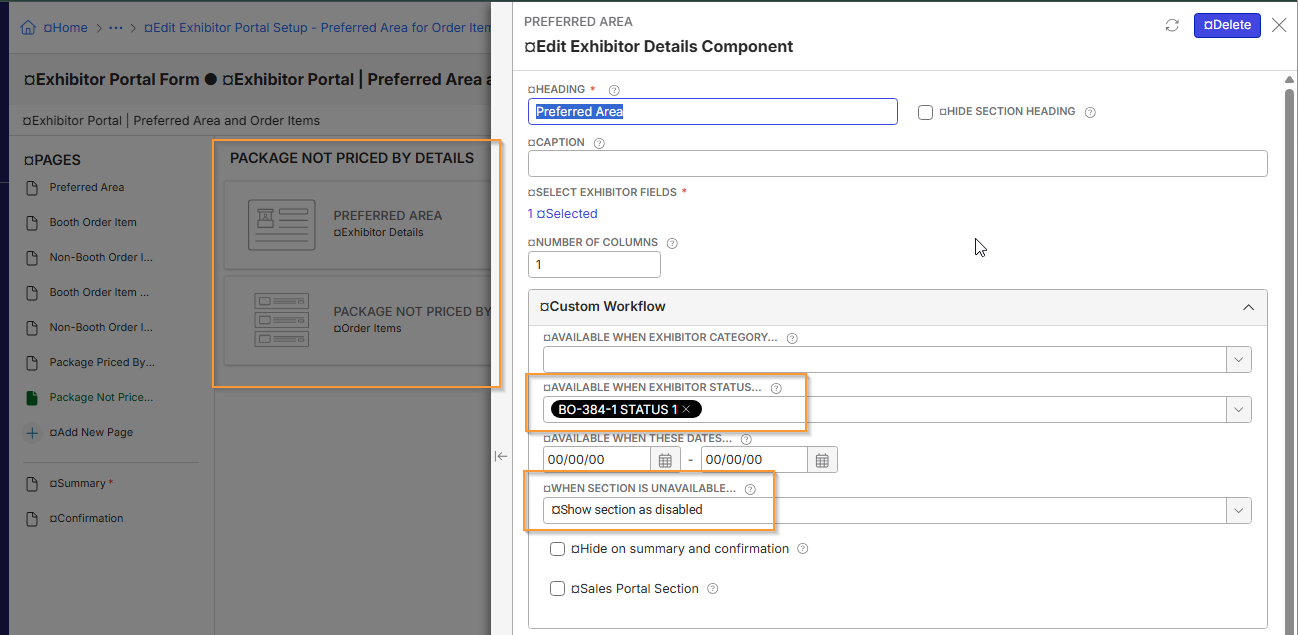
Note: There is an option to show the section but as disabled instead of hidden completely however this appears to be treating the field as if it's not on the task at all and causing the preferred area functionality not to work. This might be a bug (again this functionality was added a long time ago and I always test it with the field on the task and available for editing) or it might be intentional for some reason but I can enter it as a bug to be looked into at some point in the future.However I have verified that having the field on the task and available for editing OR on the task and hidden from view completely are both allowing the preferred area functionality to work as expected.

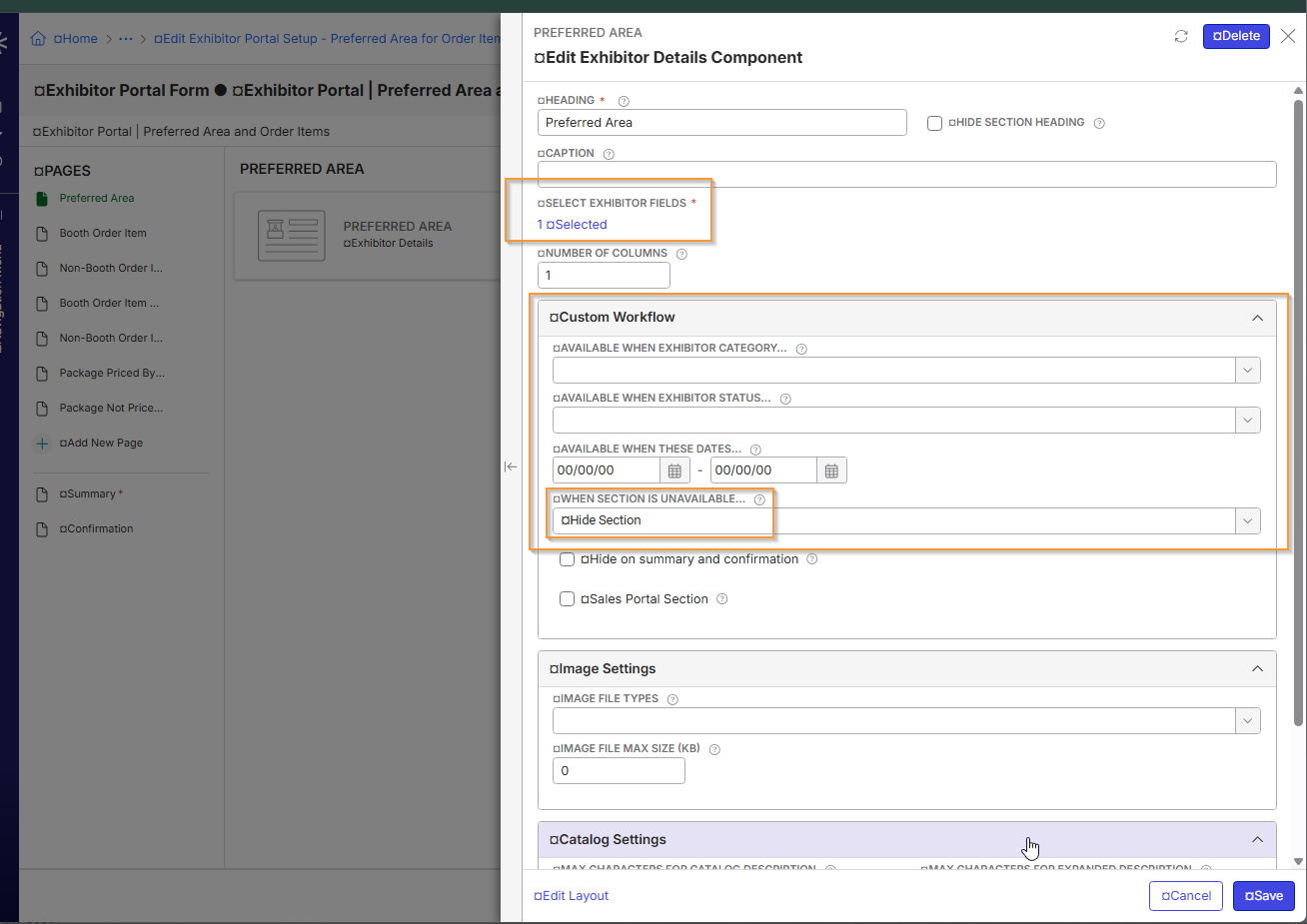

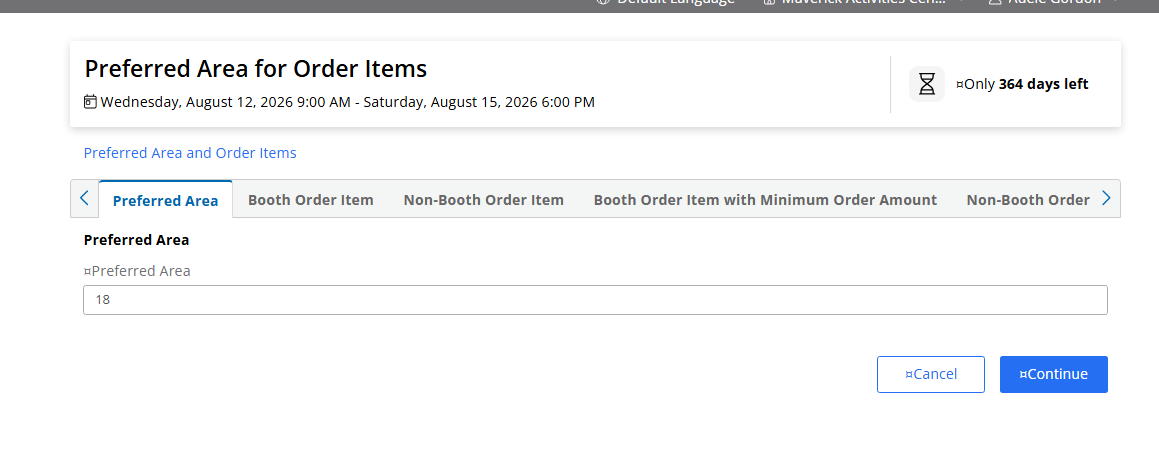
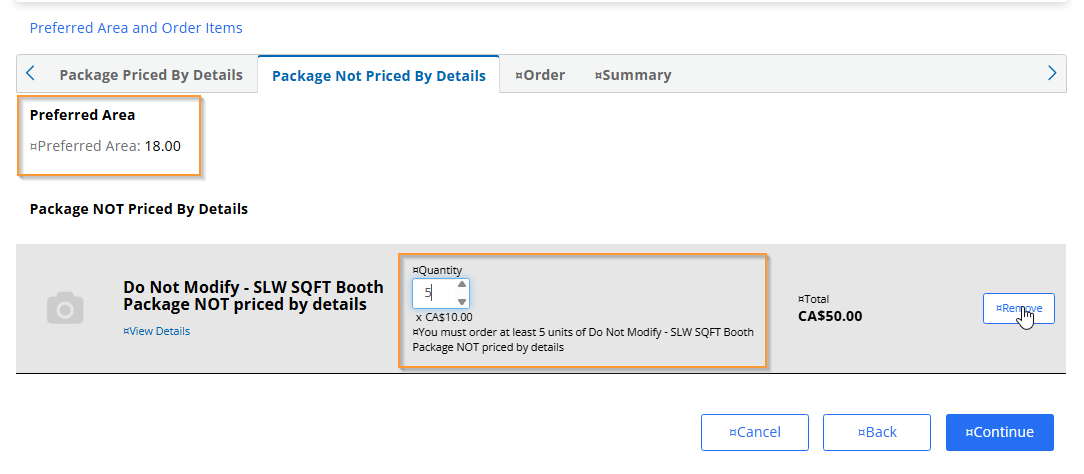
Example of the Preferred Area field hidden in the task (my exhibitor does not have the status selected on this section so they will not see this section) but still working. If I select the order item, you will see the count of 18 auto-populate which is what my exhibitor's preferred area is and is higher than the minimum order item amount of 5.

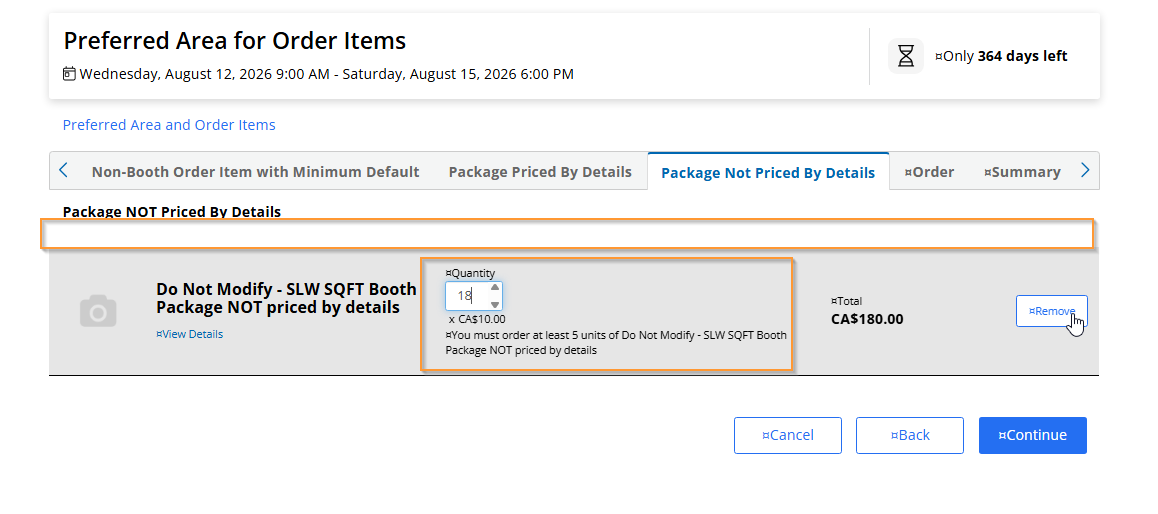
Showing the section as disabled instead of hiding it completely or showing it as available for editing does not appear to be working. This may be a bug or may be intentional due to the way we “show as disabled”. It has probably been “broken” forever if it is truly broken.
-
To summarize the thread above; the business case to link specific items in EXP to the m2 of the approved booth can be achieved using two settings:
- On the Resource, select “Use preferred booth area to populate item quantity.”
- On the Booth Proposal Component in EXP, tick “Fill in preferred info from accepted proposal.”
These two settings will default the item quantity to the square meters (m²) of the booth.
Shannon Wiley and Tragen Herrick, now it is possible to link (or default) the unit of quanity with the m2 of the booth, Jaarbeurs has a new question:
> Is there any option to only show specific items based on the m2 of the booth? For example: show only Resource 123 if the booth is 20m2 or bigger?
I know it is possible to only show specific items based on the Exhibitor Category, and Ordering Conditions could work. However, I couldn't find a way to link the Exhibitor Category or Manage Ordering Conditions in the Booth Order/Proposal/Approval Phase. This should somehow be linked to the Booth Resources.
Business Case/Workflow: it is only allowed to select Stand Construction A if your booth is > 16m2. Or it is only allowed to select Stand Construction B if your booth is between 20- 50 m2.
Any thoughts or would this be an enhancement request?
-

I dont think it is possible, but I would need Shannon Wiley to confirm.
-
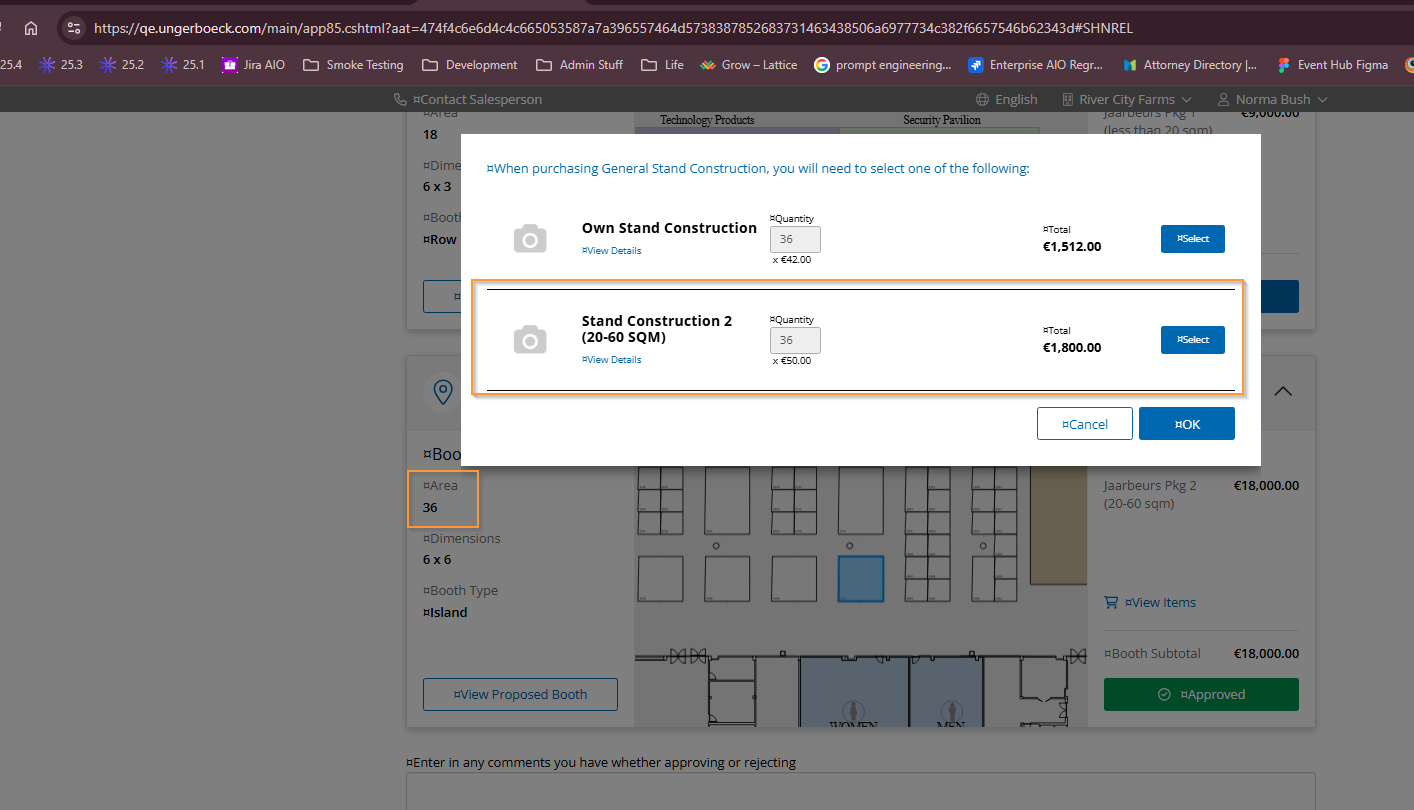
Yeah I've been thinking this over for a couple of days trying try figure out if there is some round about way to accomplish what they are wanting but I cannot think of a good way. So I do think this would be an enhancement request but I am wondering if maybe something could be done with packages and substitutions and/or upsells but I'm not skilled enough at setting up packages/resources so they fully make sense so I'm not sure if this is even worth showing but figured I'd at least share what I did try.
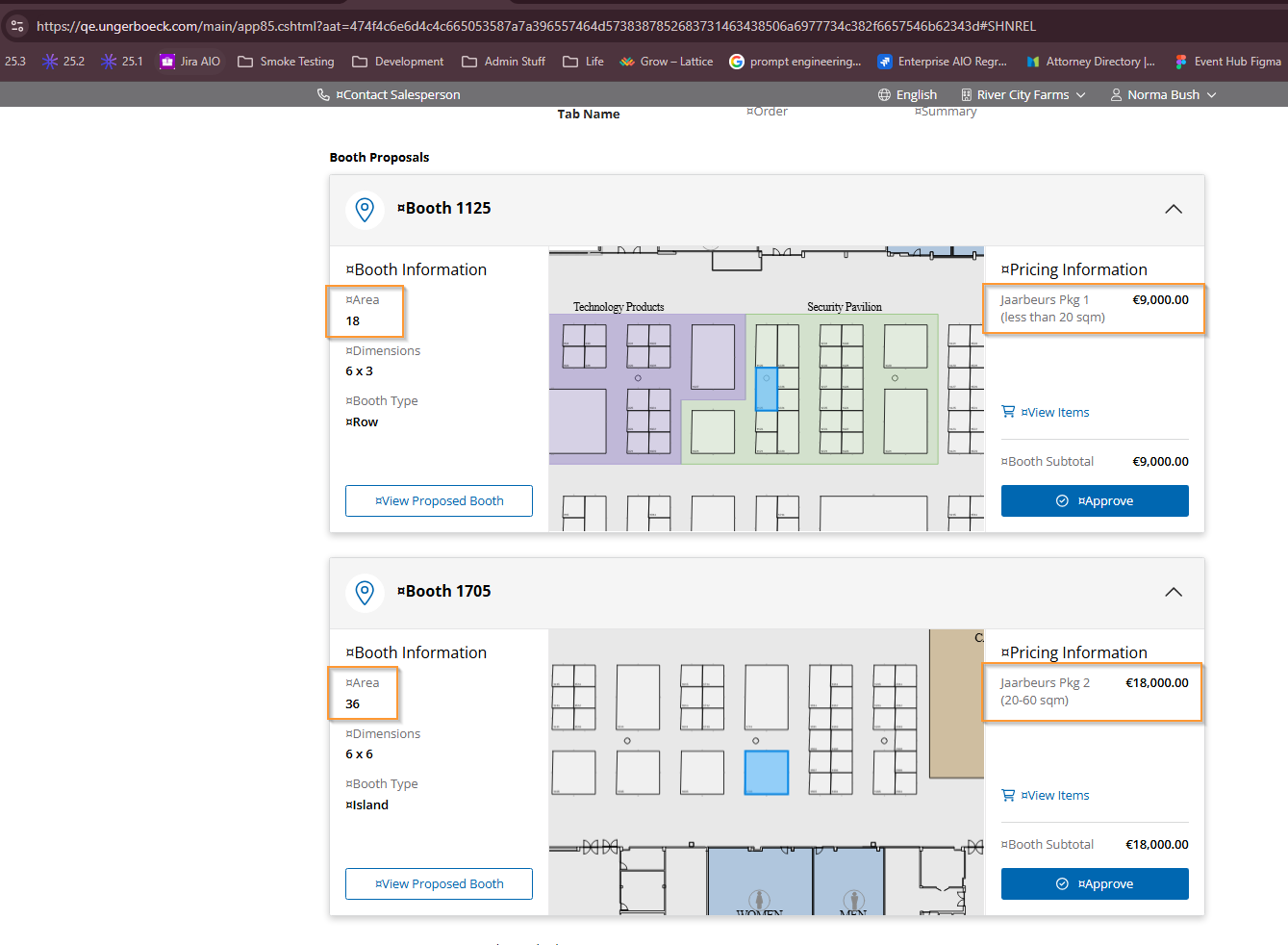
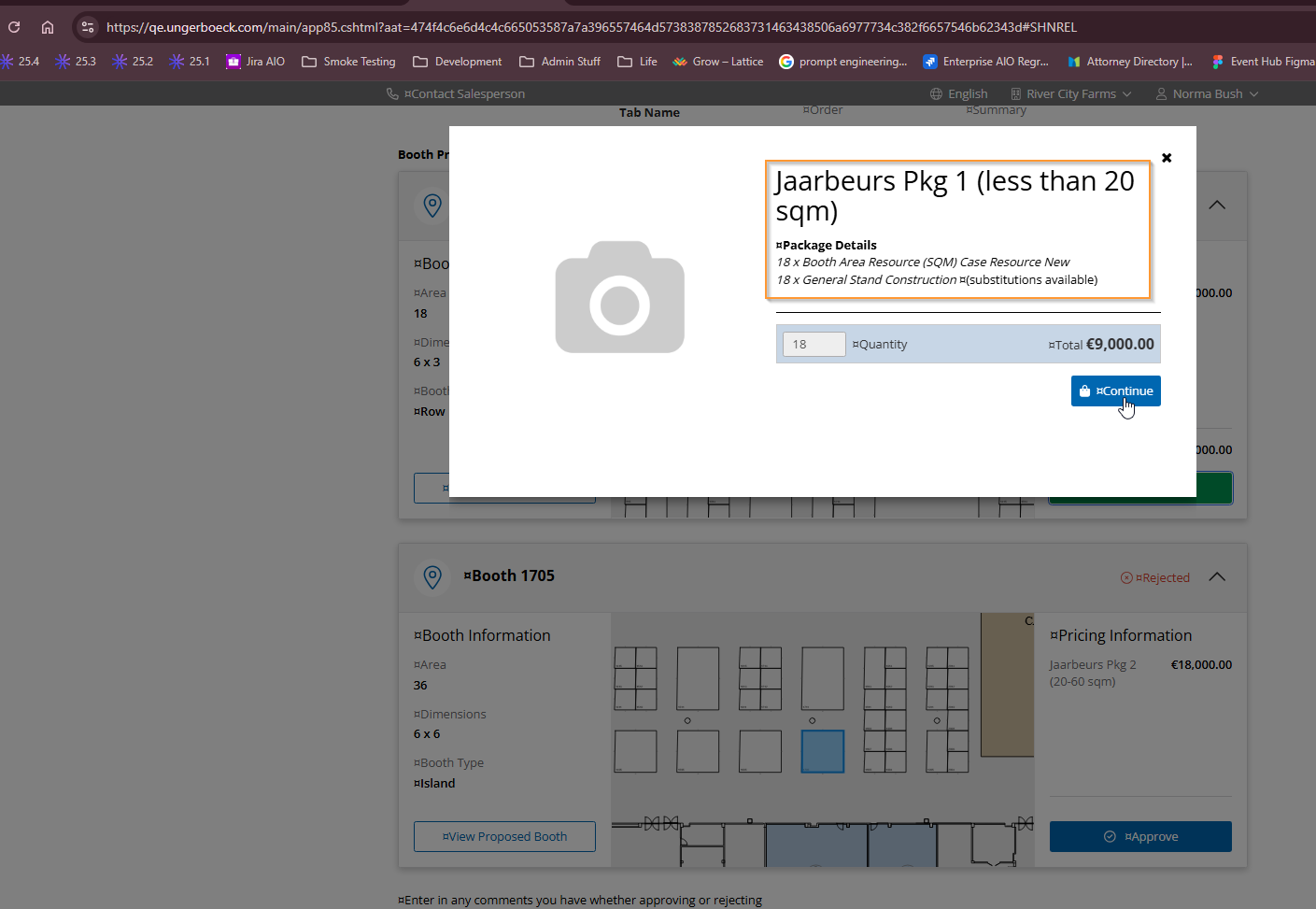
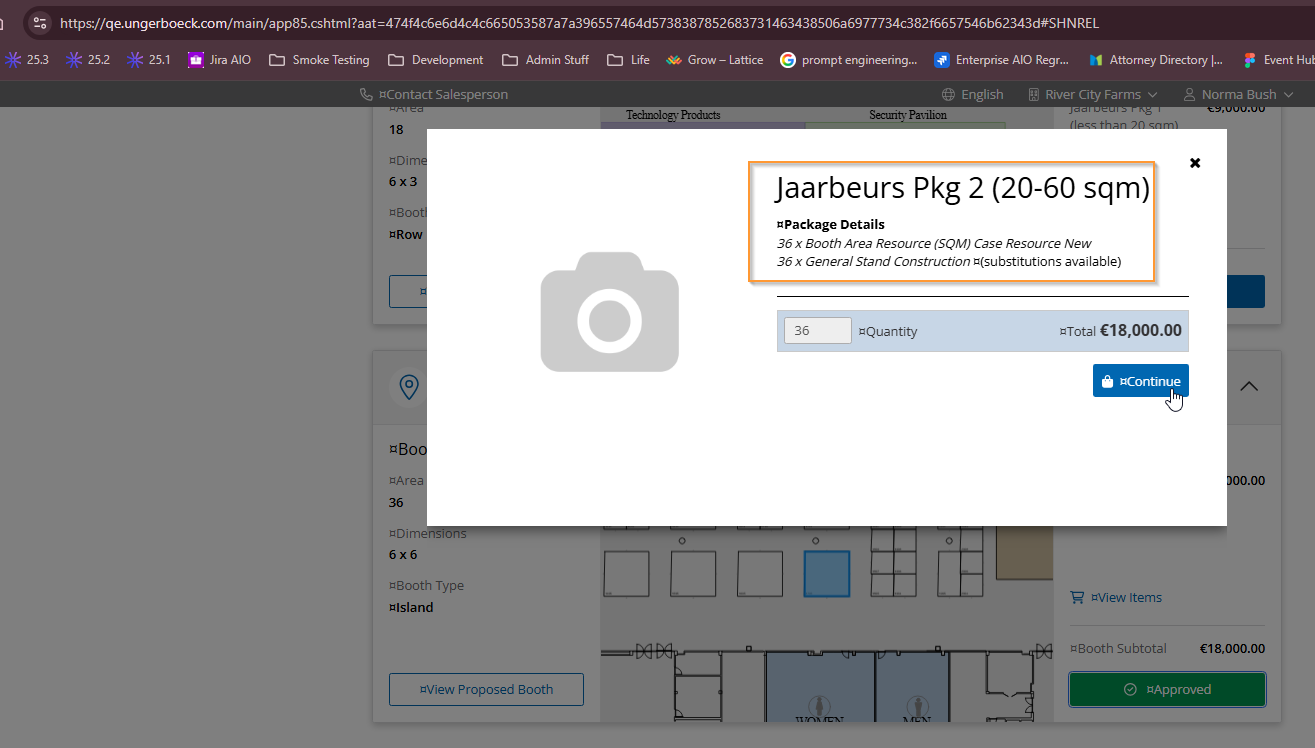
I created two different header resources for two different packages for the different booth sizes both set to priced by details. I created a general stand construction item and set it up with required substitutions of the “own stand construction” for both packages and then the respective stand construction item for the area. I cannot figure out how to get this to be a flat charge though and not by area. Not sure if I'm setting it up wrong or if this is just what happens with a SQM header resource. After adding the items to the event price list, I then set the matching package as the area resource on the matching size booths. So then when I approve a proposal, I get the same overall area charge and both have the stand construction but then the user is required to pick either their own or the item that matches their booth size.Again, this is a rough display and I do recognize this could be a pretty extensive change of process for them to possibly do this but sending it along just in case it might spark an idea.

Please sign in to leave a comment.
Comments
15 comments
Date Votes