Outlook Add-In for Single Sign-On recommended sign-in method
Answered
In the Authenticate Using Single Sign-On in Microsoft Outlook, Office & Excel Reporting Add-In article, we recommend that users select Select SAML Single Sign-On as their sign-in method. Pieter Du Plooy has suggested updating that recommendation to Saved Tokens.
Seth Halvaksz Two questions:
- Can you confirm that this is what we recommend?
- Are there any additional steps or are any of the steps different if a user selects Saved Tokens?
I've already checked with Mike Schepker and Jonathan Schmidt and they weren't aware of a change.
Thank you!

-

I will ask engineering. I was recently told that the add-ins don't use SSO at all, so need to clarify.
Engineering is at an offsite this week, so may not have an answer until next week.
-
Linda - adding comments here that i received from engineering. One thing I found out is, we DO need SSO for the Outlook Add-Ins. We do NOT need SSO for the Ungerboeck Web Add-in.
Here's the full response from engineering. Let me know if this answers:
"So to use SSO in the add-ins, the user in Backoffice needs to be configured for SSO. Then the steps for this are correct in the post.
We prefer them to use Saved Tokens and this does require the web add-in to be installed. To create/update a token, after the user signs in. They go to their user in the upper left, goes to the edit user window, in the tools drop down, there is an action for Save Add-In Token. Clicking that will connect to the web add-in, it will then create/update the USIOfficeAddIn.config file in the users roaming app data with the encrypted token. The location of the file is C:\Users\{your user name on your computer}\AppData\Roaming\Ungerboeck Systems International\USIOfficeAddIn.config. The token will have its expiration extended 2 weeks from their last sign-in. So if a user does not sign-in within 2 weeks (or if the user is retired, etc backoffice user security), the user will not be able to sign into the add-ins.
The USIOfficeAddIn.config is shared by the Word, Excel, Excel Reporting and Outlook Add-ins. So if you have connected one, it will connect all 4 since they all share the same config file.
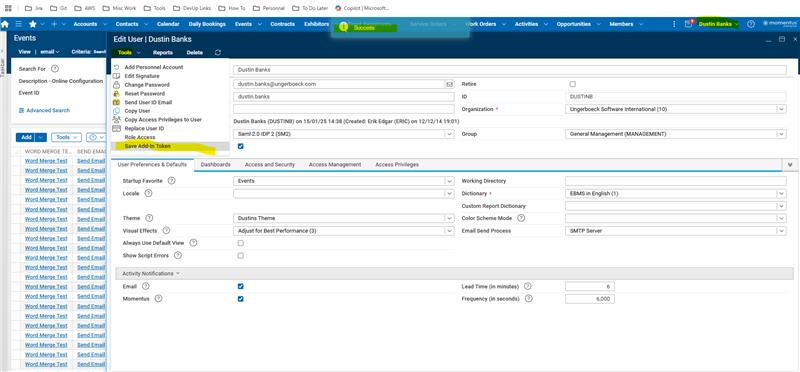
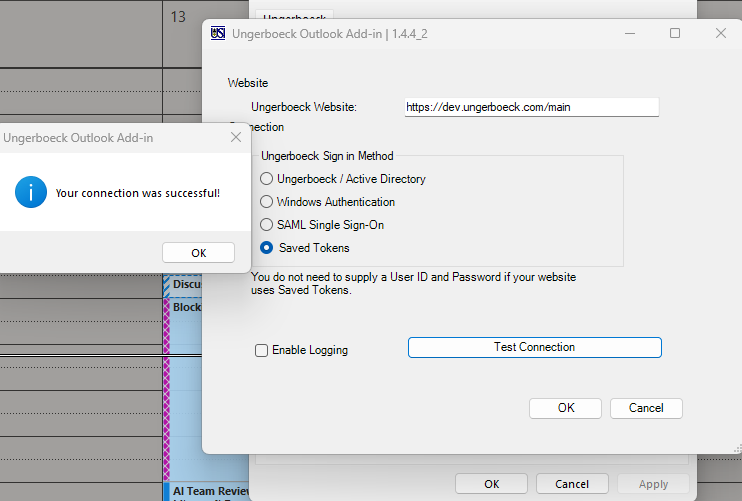
I am going to assume that we do not worry about the older version where it put the token in the user registry. That was short lived when the web add-in was not normally installed with registry edit access. "
-

Jumping in here. Seth Halvaksz It's been our experience that SSO is NOT required for the Outlook Add-in to work correctly, but it can be configured using the rest of the process that you explained. Just wanted to clarify that part since Support has been successfully configuring these Add-ins using multiple Auth configurations and using SSO as an option and not as a requirement.
-
Thanks, Seth Halvaksz - I'll work on getting the article updated. I may ask you to have your contact in engineering give that a review!
-
https://supportcenter.ungerboeck.com/hc/en-us/articles/6912629335575-Authenticate-Using-Single-Sign-On-in-Microsoft-Outlook-Office-Excel-Reporting-Add-In has been updated. Thanks all for your assistance!
Please sign in to leave a comment.
Comments
5 comments
Date Votes