Booking Calendar missing 7 Day Calendar span/view (time zones)
Refer to Product Ideas
Description of the issue: The Booking Calendar is missing 7 Day Calendar view - how can I add it back?
Account name: Lockheed Martin Global Vision Center
Region: Americas
Client version: 24.42024120601 in Prod
Steps to reproduce:
In the Classic UI, go to the Booking Calendar
Go to change the day span/view to 7 Days
Observed results: 7 Day span is missing from the dropdown menu
Expected results: 7 Day span should not be missing - how to add it back?
What is the job the client is trying to accomplish: Customer is trying to use the 7 day span calendar view.
Business impact if not resolved: Customer inconvenience. Will have to resort to using the 28 day span, which contains far more information than what is needed.
Note from Support: I've tried using Calendar Intervals to restore the 7 day view, but have not been successful. Please see the screenshots below. Am I doing something incorrectly or is this a bug?
Articles Referenced:
Calendar Intervals
Link to Zendesk ticket: 338705
Local Site: https://supportwebus.ungerboeck.com/LockheedMartin_Prod/app85.cshtml?ReturnUrl=%2fLockheedMartin_Prod
Login: usiadmin / ITRocks2014
Screenshots:

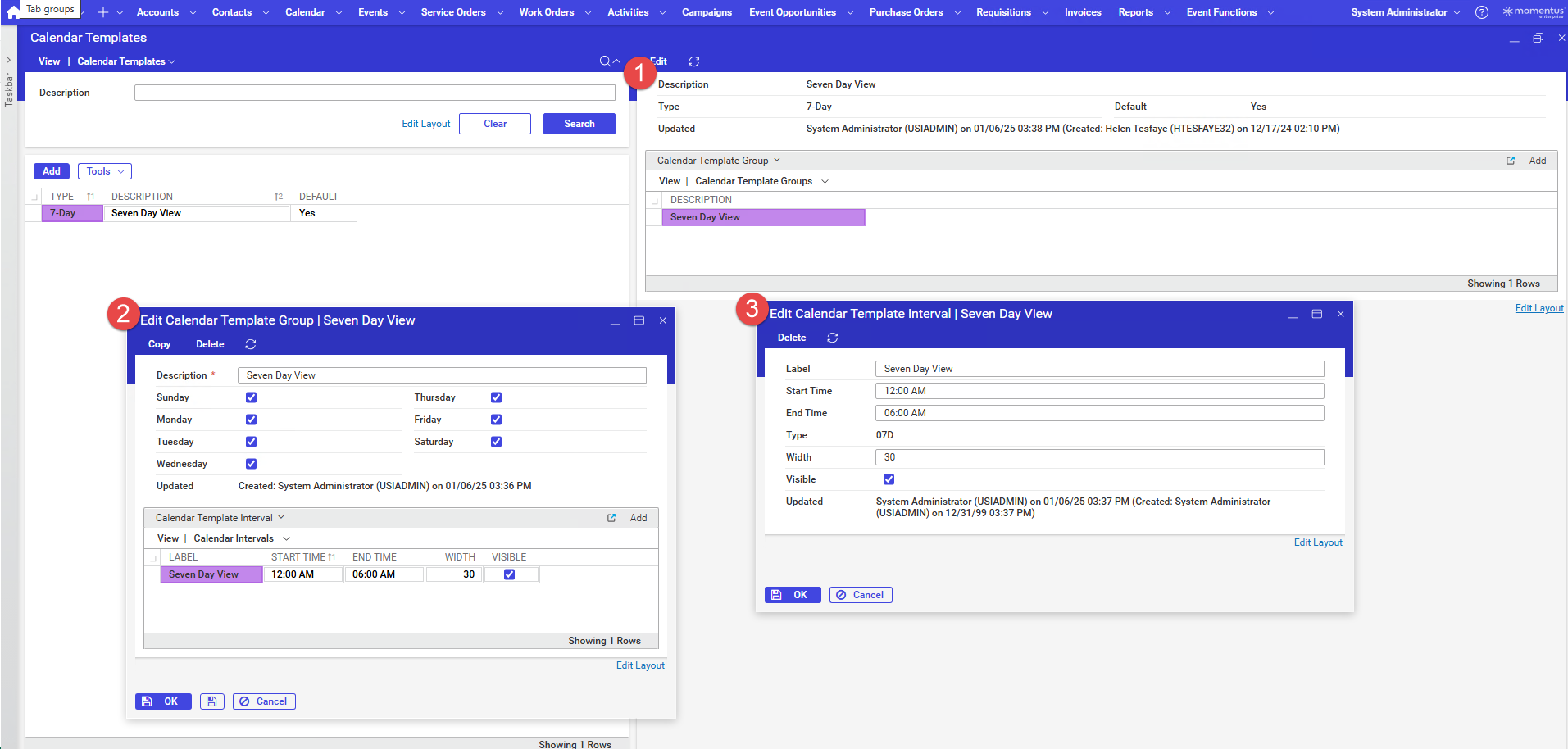
Tags: Seth Halvaksz
-

@... this customer is using time zones, and when you enable time zones we no longer support the 7-day and 14-day views.
This is something we'd consider as an enhancement request. Can you ask the customer if they are able to use other views of the availability calendar?
Here's the time zones article. Asking @... for help from her team to update to reflect that the 7-day and 14-day views aren't supported if you enable time zones.
https://supportcenter.ungerboeck.com/hc/en-us/articles/19558777729559-Events-Across-Time-Zones
-

Done! Warning has been added.
-
Hi Seth Halvaksz - Sorry to ping you again on this topic. I received a question from the customer and CSM regarding Time Zone functionality after I informed them that the 7 day and 14 day calendar views are not available when utilizing Time Zone.
The customer and CSM want to know if there is a way to enable Time Zone functionality for just a specific location rather than the entire organization:

I am guessing that this is not possible but I wanted to verify with you first.
-
@... received this guidance - let me know if this helps
"when a site is configured/licensed for time zones in general, as in it works on the v30 side, there should be in that situation a checkbox you can add to the OSB config screen called "Time Zone Searching" which I believe does give you control over which configs utilize the time zone features"
-
Hi Seth Halvaksz - I apologize for digging this thread up again. I found this KB article that I think may contradict the guidance you passed along. It is in the “Update Booking Calendar Views” section on this article.

From what I gather from the KB article, once Time Zones are licensed to the customer's account, the Booking Calendar views (and presumably the 7 and 14 day views) change. Since this change affects the Booking Calendar in v30/ Back Office regardless of the configuration of OSB, I imagine this means the 7 and 14 day views cannot be restored as long are Time Zones are enabled. Could you assist in confirming my theory? I realize this is a lot of back and fourth, so if you'd like to meet or pass me along to the Time Zone SME, please just let me know.
-
Shelby - i confirmed with engineering that with time zones on we do not support the 7 and 14 day views.
Asking @... for help in updating this article you mentioned.
-
I've added the information to the Update Booking Calendar Views section.
-

Hi Seth Halvaksz @...
We have one more customer “Doltone House”
They have a question - “Now I have a question, how can we recreate those(7 days and 14 days views) back again?”
Will disabling the ‘Events Across Time Zones’ feature restore those views? -
I am investigating if we can remove the time zones entitlement from the customer's account to bring back the 7-day calendar view. I will post here once confirmed.
-
Hi Seth Halvaksz Thank you so much for your reply.
The customer is eager to know if they can have the views back. Please see their response below:
“Any update on this?Or should we inactivate those features for now to get 7-day calendar until you find solution?”
-
We have https://ungerboeck.atlassian.net/browse/APP-6694 planned to test if removing the time zone license will re-enable the 7-day calendar view
-
Hi Seth Halvaksz Thank you so much for sending the ticket. Should we consider this as an “In Dev” ticket and attach it to our Zendesk ticket? The customer is very eager for a response. Below is their latest comment:
“May I please have quick update on this as now users are getting frustrated?I inactivated those two features but still not working.
Can you please let me know how can we bring back those two calendar views ASAP?”
-
I'll provide an update on this by Friday.
The purpose of this ticket is only to test if removing the time zone entitlement brings back the 7-day calendar view. I will ask if it also brings back the 14-day calendar view.
-
Akash Satalkar we've confirmed that if we remove the time zone entitlement, the 7-day and 14-day calendar come back.
Please reach to Sara Noonan and send her the serial number for the customer in teams message (log in, go to Name > Help > About > License and send me a screenshot)
-
Thank you so much. I will reach out to Sara.
Please sign in to leave a comment.
Comments
15 comments
Date Votes