AD User Signed in via SSO
Answered
Description of the issue: A user set up to use Active Directory for their Authentication was able to log in via SSO
Account name: Oklahoma State Fair, Inc.
Region: US
Client version: 24.3
Steps to reproduce:
1. AD user has an email address that matches their company's identity provider's login.
2. User clicks the SSO button to login using their IDP instead of using the login form on the Momentus sign in page.
3. User inputs their SSO credentials in their IDP login page
4. User is redirected back to Momentus signed in, despite his back office user set to use AD for authentication.
Their web config is set up to Defined Per User for authentication since some users use SSO and some use AD.
It should be noted that we cannot recreate this locally as we do not have access an SSO environment to test this. I can set up a local site, but would still have no way to test SSO locally.
Observed results vs Expected results: User is successfully logged in via SSO even though their back office user was set to AD. I would think a message should be displayed saying they need to login using the form.
What is the job the client is trying to accomplish: Log in appropriately.
Business impact if not resolved: Low impact. They have since switched the user to SSO anyway, but they wanted to report this in case this wasn't expected behavior.
Links to articles where you've looked for solutions and also other steps you've taken to research the issue:
https://supportcenter.ungerboeck.com/hc/en-us/articles/8528485298455-Authentication-Configurations-in-the-Momentus-Cloud
https://supportcenter.ungerboeck.com/hc/en-us/articles/360011286293-Single-Sign-On
Link to Zendesk ticket: https://ungerboeck.zendesk.com/agent/tickets/332497
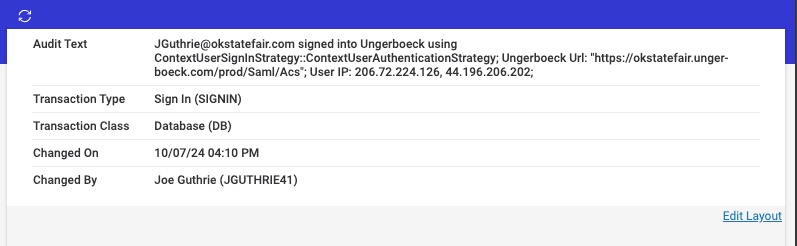
Here is an audit log record showing that the user logged in via SSO:
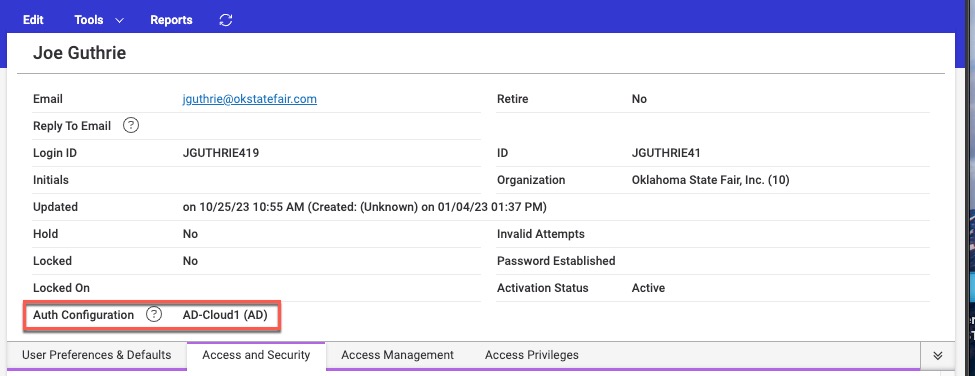
And what the user's Auth Config is set to:
Is this a bug or working as designed? @... Seth Halvaksz
-

Seth Halvaksz - Can you get this routed to the correct person? Might need to do some research on if there are real world reasons to allow this.
-

Mike S - SSO can use Active Directory as the identity provider. What you described above is expected behavior. I'm not sure i understand the question.
-
In this case they are two different providers. One is their IDP that is SSO. The other is Momentus Active Directory, which is what this user is set up to use. If the user that is set up to use Momentus Active Directory clicks on the SSO link that takes the user to their organization's IDP and signs in, it logs them into Momentus. They never authenticated against Momentus Active Directory despite that being the authentication set up on the user.
-
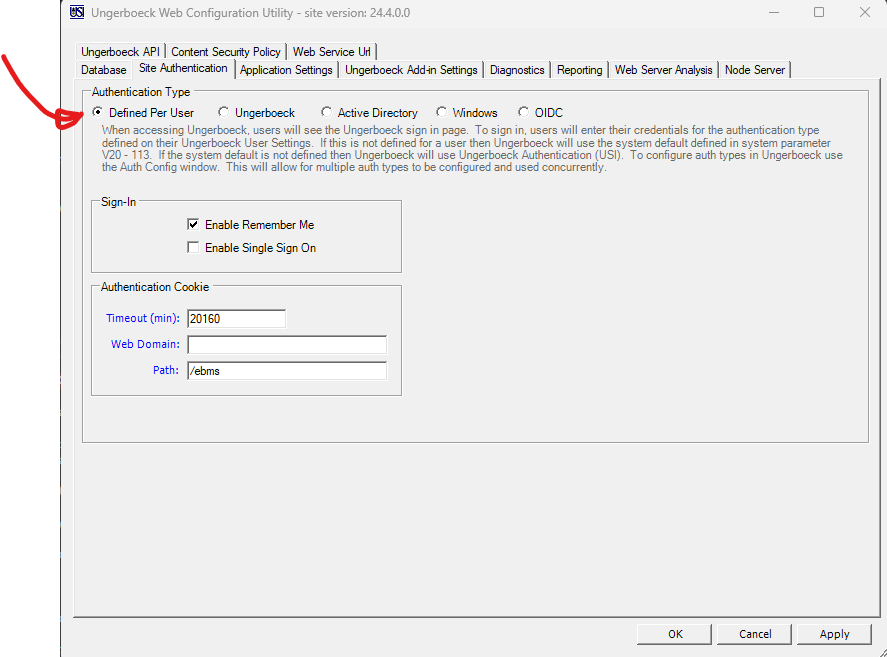
Mike, i looked into this. You need to verify the setting on the web configuration utility. If its set to “Defined Per User” then it uses the user's auth setting. Otherwise it doesn't.
Here's the relevant article. It could be clearer to say that the other authentication types will ignore the individual user authentication setting.
https://supportcenter.ungerboeck.com/hc/en-us/articles/360011192594-Authentication-Types
Screenshot:
-
Tagging @... for review/update of the KB articles to make sure this is clear (and/or may need to link to the web configuration article on the main SSO page)
-
Hi Seth,
I mentioned in the initial post that they are set to Defined Per User already, which is how some users are able to login with SSO and some are able to log in with Momentus AD, which is working fine. The ‘problem’ here is a user set up to use Momentus AD was able to log into Momentus using SSO. So we are authenticating the user using SSO when they aren't set up to use SSO for authentication.
Thanks,
Mike
-
Got it. Clarified these additional details:
- The Auth Configuration on a user has no effect if using a SSO IDP
- It is only looked at if the user is using the Momentus Sign-in interface
- The log entry is using SAML, which means they used their SSO IDP
This doesn't appear to be reflected in documentation, so will ask Linda to update.
-
Hi Seth,
Perfect, that's what I needed to know. Thank you!
Please sign in to leave a comment.
Comments
8 comments
Date Votes