Formatting when using Nested Templates
Refer to Product Ideas
- Description of the issue: Line breaks inserted into email when nesting templates
- Account name: Monona Terrace Community and Convention Center
- Region: US
- Client version: 23.1
-
Steps to reproduce:
1. Create an email template and add some text. Insert a field wildcard as well.
2. Insert a template into the email template using the insert template button within the text so that there is text before and after the template wildcard.
3. Send or preview the email and see that there are line breaks before and after the inserted template. - Observed results vs Expected results: Line breaks before and after the nested email template wildcard. The customer expects the text to appear on the same line as the text that appears before and after it in the editor instead of on new lines.
- What is the job the client is trying to accomplish: Create email templates that embed other templates.
- Business impact if not resolved: Extra work to fix the formatting before sending the email.
-
Links to articles where you've looked for solutions and also other steps you've taken to research the issue:
https://supportcenter.ungerboeck.com/hc/en-us/sections/200709888-EZWriter - Link to Zendesk ticket: https://ungerboeck.zendesk.com/agent/tickets/328124
Here is an example in the Quality database. I created a template that has another template nested. MYORGANIZATION is the tag for the other template.

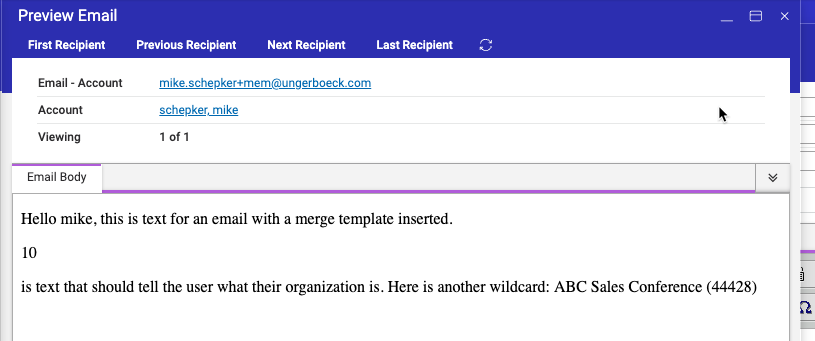
When you preview or send it, you can see that it puts a break before and after the data from the nested template.
Is this working as designed?
Richard Marmura
-

I believe this will need to be considered as an enhancement request. This is how we currently handle nested templates.
What is the client's example that requires the template to be embedded inside the template text?
-
@... Thanks, I'll let them know. Here is their example below. They are including an EZwriter template that pulls a deposit amount within their Events email template. I'll let them know they would be better off reformatting the email so that any data pulled from other templates is not inline with other text.

Please sign in to leave a comment.
Comments
2 comments
Date Votes