Room Types and Property Type Resources
Answered
Utilizing the new Room Types options for Disney. Trying to understand some of the logic and link we have created.
Steps we have taken so far:
- Created Room Type Resources
- Created Room Types attached to these Resources
- Assigned the Room types to Properties
In doing so we noticed the system will automatically create a Class 2 Resource for each Room type we add to each Property. If this action automatically creates a new resource, what is the intent of the Room type resources? When actual charging for these Room types occurs, are these auto created resources what is used for charging?
-

This is all existing functionality, nothing new with the enhancements in 24.1/2/3.
From what I understand, this works similar to booking rates when creating the contract. The system will auto generate the appropriate order items when the contract is created based on the room types selected in the room block(s), along with the resources mapped to those room types.
I'm not sure who is an expert with existing room blocks and contracts.
-

@... yeah, that assumes we already knew how room blocks and room types worked before, lol…. We need product to guide us here:
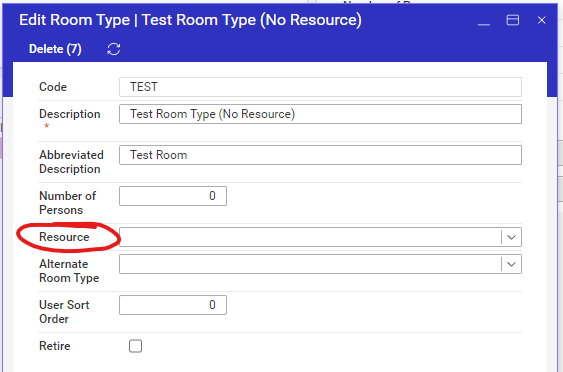
A) To create a room type, we must assign it to a Resource. Should this ‘Resource’ be a class 2 or a class 3 resource?
B) When we add a room type to a property, we notice the system automagically creates a class 2 resource type for the property AND a resource for that room type at that property. We recognize these are the resources that the user must then add to price list under the BK order form in order for the system to generate housing service orders. Does the user have any control in the resource type codes used? Should we have created our Room Type resource types (in question A) as class 2 b/c of this?
-
Richard Marmura i think you're Casino/Resorts guy now, right? see above ^^^^
-
Yes, they must be class 2 resources and on the code = BK order form on the price list.
-
@... Richard Marmura can you see any benefit to assigning a resource to Room Types now that the system automatically generates a Resource Type for the property and Resource for each room type at that property.
-

Hello All -
I had a ticket come in with the same question. They just recently noticed the duplicate resources and is getting confusing on the Event/Registration side of associated a resource/room type.
Some additional guidance would be helpful.
-Room Type Resources should be Class 2?
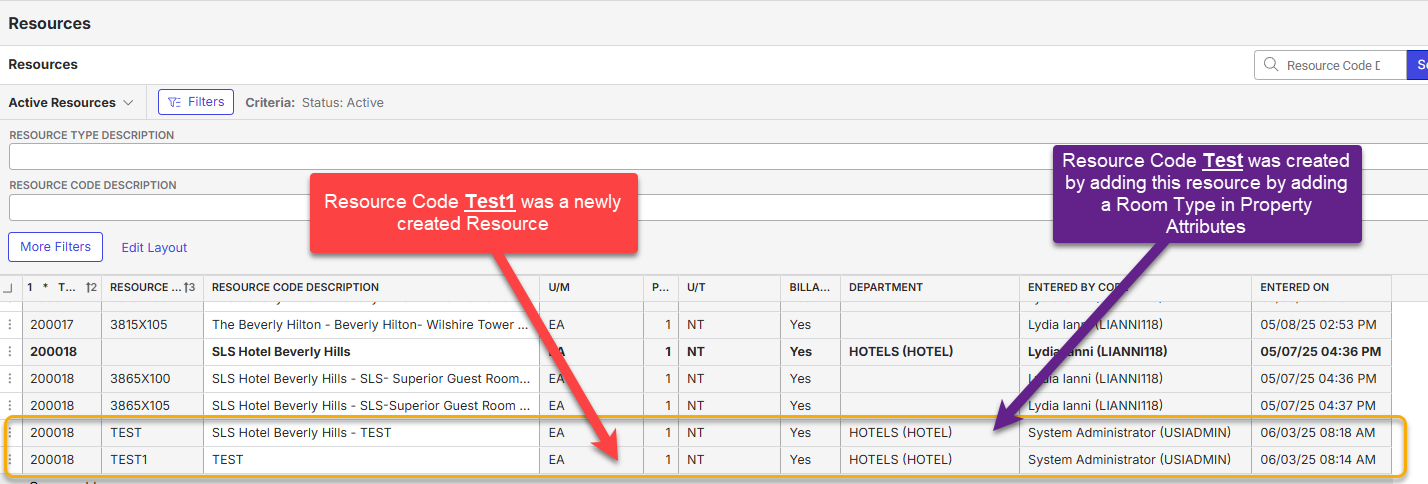
-Once a room type is associated with a property, it will generate a new resource to map everything together (as designed).
-From the Event/Registration Setup, is it best to track via original resource code to create proper Room Flow or newest resource code?
See ticket here: https://ungerboeck.zendesk.com/agent/tickets/356754
-
Hey Richard Marmura…I was curious to see if I could have additional guidance with the duplicate resource and best practice for customer just noticing the functionality. Thanks!
-
Justin Wittrock Anthony Costantino Richard Marmura
https://ungerboeck.zendesk.com/agent/tickets/356754
I completed additional testing and created a new resource code in Class 2. The resource also duplicated once I added it as a Room Type on Property Attributes (Property -SLS Beverly Hills)
Any additional guidance for explanation to the customer?
-
@... The ‘automatically create resources’ for property room types was introduced in 25.1 as part of the work for Housing for Hospitality.
https://supportcenter.ungerboeck.com/hc/en-us/articles/211127268-Housing-Overview
https://supportcenter.ungerboeck.com/hc/en-us/articles/24617867026071-Configure-Housing-for-HospitalityAs of now, there's nothing the client can do to turn off this behavior. They should be able to mark the unused class 2 resources inactive so they aren't used moving forward.
Product will need to get this feedback so they can evaluate and develop different behavior, though I agree, we should have a way to turn on the automatic behavior depending on whether your using the Hospitality Housing functionality or Online Reg Housing functionality. This is a more indepth and long-term decision.
Recommend submitting feedback to Pendo and asking client to do the same.
Please sign in to leave a comment.
Comments
9 comments
Date Votes