DocuSign - contract revisions
Answered
Please see the inquiry from Kay Bailey (Dallas Convention Center). Any assistance is appreciated.
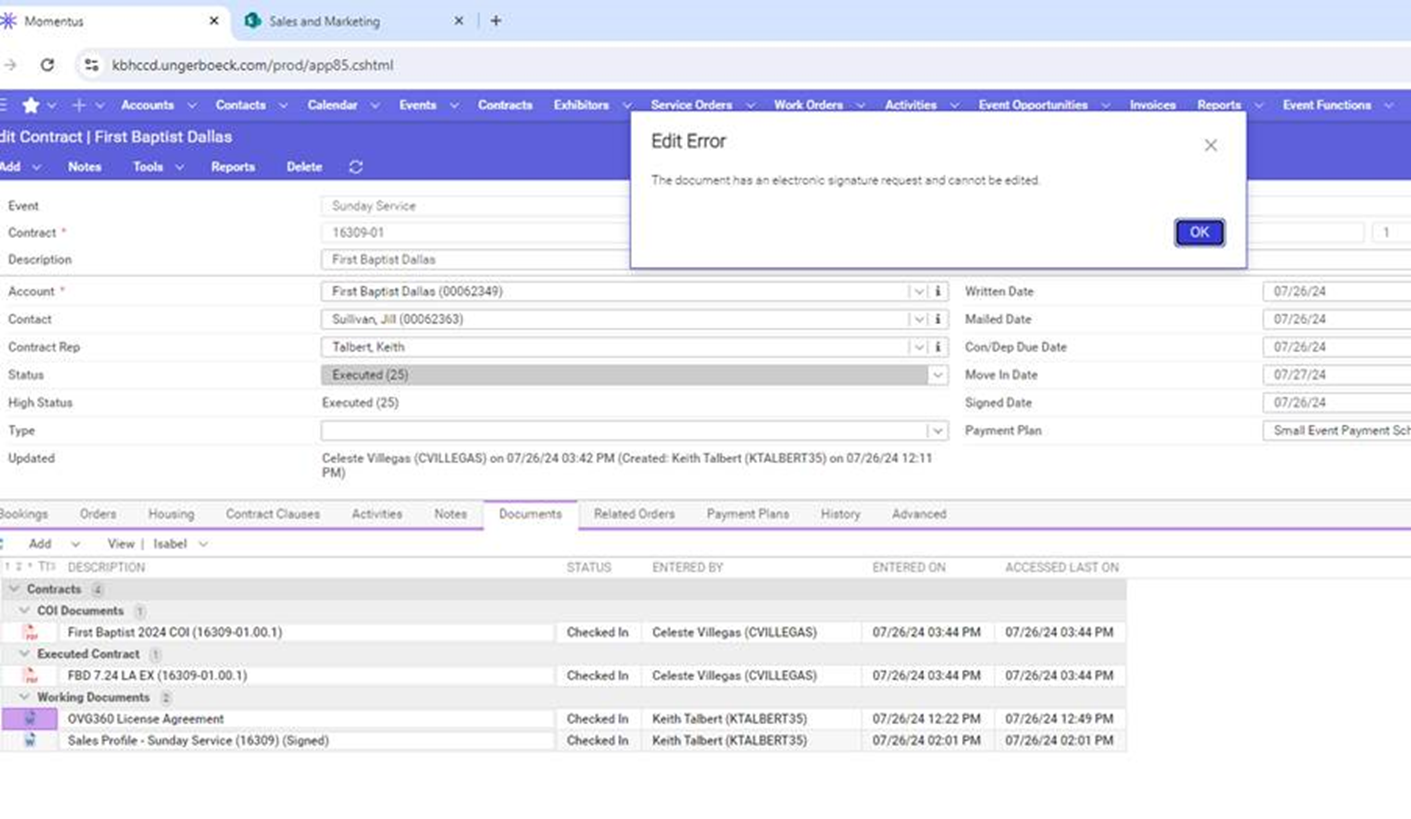
Below, under Working Documents, you will see the OVG360 License Agreement (the unsigned copy but what was initially sent to the client for signature) and the signed DocuSign agreement called Sales Profile – Sunday Service (16309). I was under the impression that the OVG360 License Agreement would be a working document that could be edited if changes need to be made, but we are not allowed to do so since it is tied with DocuSign after being sent.
Is there a way around this if we need to make edits or negotiate with the client after the document is sent? Also, if not, what is the recommendation for proceeding without breaking the Momentus and DocuSign connection?
Please let me know your thoughts when you have a free moment. As always, I appreciate your help!
-

Caty Pomeroy - Let me know if I'm not following something correctly on this.
Once a document is sent for signature, it is no longer editable regardless if it is signed or not. My recommendation is that a copy of the document should be made before sending it if it is going to continue to be modified.
-
Correct - I believe they are hoping to avoid the revision to count as an envelope since the document is not executed.
They are seeking the best practice for handling revisions in terms of voiding the send vs letting it expire. Is the best practice to copy the original document, make edits and resend as a new envelope?
Thanks, @...!
-
From what I can tell, a voided envelope still counts - https://support.docusign.com/s/articles/FAQs-related-to-Voiding-Envelopes-in-DocuSign?language=en_US&rsc_301#:~:text=Do%20voided%20and%20deleted%20documents,against%20the%20total%20envelope%20count.
It also seems that an expired document counts as it changes to voided as well - https://community.docusign.com/sending-8/envelope-expiration-date-time-1452#:~:text=Best%20answer%20by%20Community%20Expert&text=Thank%20you%20for%20reaching%20out,viewed%20or%20signed%20by%20recipients.
It looks like revising a document will not count as another envelope - https://support.docusign.com/s/articles/FAQ-Docusign-Envelope-Allowance?language=en_US#:~:text=No%20matter%20how%20many%20documents,its%20status%20changed%20to%20Sent.
As for best practice recommendations, it may come down to what is being revised. If they are just minor adjustments, I would think they could be made on the DocuSign side as they will be saved back to Enterprise when the document is signed (at least that is how I think it works). If we are talking about major revisions that requiring pulling new data from Enterprise, it might make sense to void and send a new document.
-

Agreeing with Mike here, that minors edits to be made via DocuSign>Send folder>finding the envelope that needs to be edited. I would have them make the edits first in MT then export the document out and use that export in DS to basically replace the document in the sent envelope. If it it is a major edit, I would recommend they setup an amendment/addendum process that has them send out the amendment/addendum as an envelope to be signed as well. Or do the void (which would still be an envelope count) and send a new document.
-
Thank you so much for your help!
Please sign in to leave a comment.
Comments
5 comments
Date Votes